07. 데이터 분석과 준비: 실습 기록
07. 데이터 분석과 준비에서 정리한 내용을 책의 코드로 직접 실행한 기록이다. 개념과 요점은 본문에 두고, 여기에는 명령, 실제 출력과 화면만 모았다.
실습 순서
이 실습은 책의 두 데이터 준비 파이프라인을 4~5장에서 만든 book-env 클러스터에서 돌린다. 저자 코드를 먼저 그대로 실행해 어디서 멈추는지 보고, 필요한 부분만 고친 컴포넌트로 다시 실행해 KFP 화면과 저장소에서 결과를 확인한다.
    flowchart LR
    accTitle: 책 7장을 따라가는 실습 순서
    accDescr: 탐색 환경과 노트북을 준비하고 파라미터와 아티팩트 전달을 작은 파이프라인으로 확인한다. 이어서 신분증 탐지 데이터와 MovieLens 데이터를 준비하는 파이프라인을 원본과 수정본으로 실행하고 결과를 정리한다.
    A["A. 탐색 환경과 노트북"] --> B["B. 파라미터와<br/>아티팩트 전달"]
    B --> C["C. 신분증 탐지<br/>데이터 준비"]
    C --> D["D. MovieLens<br/>준비와 QA"]
    D --> E["E. 결과 정리와<br/>다음 단계"]
| 구간 | 끝났을 때 남는 것 |
|---|---|
| A. 탐색 환경 | .venv-ch07, 저자 저장소 두 개, data\ml-latest-small, 합성 신분증 120장, 실행된 탐색 노트북 |
| B. 데이터 전달 | KFP 실험 ch07-data-prep, 성공한 joke 실행 두 개 |
| C. 신분증 데이터 | ch07-raw 버킷의 원천, 실패한 원본 분할 실행, 성공한 수정 실행과 세 분할 아티팩트 |
| D. MovieLens | datasets/ml-latest-small/의 parquet 네 개, 원본 분할과 QA의 실패 기록, 수정 QA 통과 기록 |
| E. 정리 | 다음 장이 읽을 데이터 위치와 계약, 정리 명령 |
책과 달라진 조건은 다음과 같다. 자세한 이유와 수정 내용은 해당 단계에서 다룬다.
| 책의 조건 | 이 실습 | 이유 |
|---|---|---|
| Kubeflow Notebooks의 노트북 서버 | PC의 JupyterLab | book-env는 KFP standalone이라 Notebooks가 없다 |
| Manning Box의 신분증 압축 파일 | 직접 만든 합성 신분증 120장 | 2026-11-07 기준 저자 URL이 HTTP 404를 반환했다 |
| MovieLens 25M | MovieLens ml-latest-small | 25M은 압축 파일만 약 261MB이고 Pod 메모리와 시간이 크게 든다 |
| 저자 컴포넌트 그대로 | 원본을 먼저 실행한 뒤 고친 컴포넌트 | 원본의 실패 위치를 확인하고 고친 부분만 바꾸기 위해서다 |
명령은 ml-platform-book-env 최상위 폴더의 Windows PowerShell에서 실행한다. 4장의 A-3처럼 python bookenv.py forward를 다른 창에 켜 둔 상태여야 한다.
A. 탐색 환경과 노트북
전체 그림에서는 ①~②에 해당한다.
A-1. 앞 장의 환경 확인
- 클러스터와 포트포워딩 상태를 확인한다.KFP, S3, MLflow, Redis Pod가 모두
python bookenv.py statusRunning이어야 한다. - http://localhost:8080 의 KFP와 http://localhost:8888/buckets/ 의 저장소가 열리는지 본다. 버킷이 하나도 없다면 4장 A-4처럼
python bookenv.py buckets로 만든다.datasets와ch07-raw는 7장의 파이프라인이 직접 만들므로 미리 만들 필요가 없다.
4~5장의 JupyterLab은 PC에서 돌린 개발 환경이다. kind에는 KFP standalone만 설치했으므로 Kubeflow 대시보드의 Notebooks 메뉴나 Notebook Controller가 없다.
| 구분 | PC의 JupyterLab | Kubeflow Notebooks |
|---|---|---|
| 실행 위치 | PC의 Python 프로세스 | 클러스터의 Notebook Pod |
| 환경 | 로컬 가상환경 | Notebook 이미지 |
| 파일 | PC의 작업 폴더 | 연결한 볼륨 또는 Pod의 임시 공간 |
| 서비스 접속 | localhost 포트포워딩 | 클러스터 DNS와 권한 |
| 자원 | PC의 CPU, 메모리, GPU | Pod의 요청량과 제한, 노드 배치 |
책처럼 Kubeflow Notebooks를 쓰려면 따로 설치해야 한다. 이 차이를 알고 있어야 4장의 localhost 설정을 Pod에 그대로 넣는 실수를 피한다.
A-2. 저자 코드와 가상환경
저자 코드를
upstream\에 받는다. 책이 안내하는chapter-7저장소는 2026-11-07 기준 공개되어 있지 않다. 7장 코드는 두 프로젝트 저장소에 나뉘어 있다.git clone https://github.com/practical-mlops/object-detection-project.git upstream\object-detection-project git -C upstream\object-detection-project checkout c6afb114e628e776a76f9ac50b45899aff5e8eaf git clone https://github.com/practical-mlops/movie-recommender-project.git upstream\movie-recommender-project git -C upstream\movie-recommender-project checkout 4e0a808e0dca3aef16850cd14df47d2fda9f9bd2프로젝트 기준 커밋 데이터 준비 진입점 object-detection-project c6afb114, 2025-01-02data_prep_pipeline.py,chapter_7\*.pymovie-recommender-project 4e0a808e, 2025-04-1801_data_preparation_pipeline.py컴파일과 탐색에 쓸 가상환경을 따로 만든다. 영화 추천 저장소의 requirements가 KFP 2.11.0이므로 앞 글의
.venv-book(KFP 2.9.0)을 덮어쓰지 않는다.uv venv .venv-ch07 --python 3.12 uv pip install --python .venv-ch07 kfp==2.11.0 jupyterlab pandas pyarrow matplotlib pillow boto3 .\.venv-ch07\Scripts\Activate.ps1 python -c "import kfp; print(kfp.__version__)"2.11.0이 나오면 된다. 이 SDK로 만든 YAML은 KFP 서버 2.4.1에서 이번 실습 범위 안에서 문제없이 돌았다.이 장에서 만드는 스크립트를 둘
ch07폴더와 데이터 폴더를 만든다.New-Item -ItemType Directory -Force ch07, data | Out-Null
이 환경은 탐색 노트북을 돌리고 파이프라인 정의를 YAML로 바꾸는 데 쓴다. 실제 작업 Pod의 의존성은 컴포넌트의 packages_to_install이 정한다. PC에 KFP를 설치했다고 다운로드와 변환 작업의 환경까지 고정되지는 않는다.
A-3. 탐색할 데이터 준비
- MovieLens 작은 데이터셋을 내려받는다. GroupLens 이용 조건에 따라 데이터는 각자 내려받고 저장소에 다시 배포하지 않는다.
curl.exe -sSL -o data\ml-latest-small.zip https://files.grouplens.org/datasets/movielens/ml-latest-small.zip
Expand-Archive -Force data\ml-latest-small.zip data
Get-Content data\ml-latest-small\ratings.csv -TotalCount 3
userId,movieId,rating,timestamp 1,1,4.0,964982703 1,3,4.0,964981247 - 책의 신분증 데이터 주소를 확인한다.이번 확인에서는
curl.exe -sIL https://manning.box.com/shared/static/34dbdkmhahuafcxh0yhiqaf05rqnzjq9.gz | Select-String "HTTP/"HTTP/1.1 404 Not Found가 나왔다. 원본 다운로드 컴포넌트는 응답 상태를 보지 않으므로, 404 페이지를 압축 파일로 저장한 뒤tarfile에서 실패하게 된다. 원본 컴포넌트를 클러스터에서 그대로 실행해 보지는 않았다. - 그래서 저자 코드가 기대하는
MINIDATA/images,MINIDATA/labels구조로 합성 데이터를 만든다. 배경 위에SAMPLE ID카드를 그린 이미지라 실제 신분증이나 개인정보는 없다. MIDV-500이 영상에서 뽑은 프레임이라는 점을 흉내 내어, 12개 clip마다 카드가 조금씩 움직이는 프레임 10장을 만든다.ch07\make_synthetic_idcards.py로 저장한다."""Synthetic ID-card detection data in the layout the author's split code expects. No real documents or personal data: each image is a drawn card with the word SAMPLE on a noisy background. Frames of the same clip share a background and drift slightly, imitating adjacent video frames in MIDV-500. """ import argparse import random import tarfile from pathlib import Path from PIL import Image, ImageDraw, ImageFilter W, H = 320, 240 def make_frame(rng, clip_bg, card, jitter): img = Image.new("RGB", (W, H), clip_bg) draw = ImageDraw.Draw(img) for _ in range(40): x, y = rng.randrange(W), rng.randrange(H) c = tuple(max(0, min(255, v + rng.randint(-40, 40))) for v in clip_bg) draw.ellipse([x, y, x + rng.randint(5, 30), y + rng.randint(5, 30)], fill=c) cx, cy, cw, ch, color = card cx += rng.randint(-jitter, jitter) cy += rng.randint(-jitter, jitter) x0, y0 = max(0, cx - cw // 2), max(0, cy - ch // 2) x1, y1 = min(W - 1, cx + cw // 2), min(H - 1, cy + ch // 2) draw.rounded_rectangle([x0, y0, x1, y1], radius=8, fill=color, outline=(40, 40, 40), width=2) draw.rectangle([x0 + 8, y0 + 8, x0 + 8 + (x1 - x0) // 4, y1 - 8], fill=(200, 200, 210)) draw.text((x0 + (x1 - x0) // 3, y0 + 10), "SAMPLE ID", fill=(20, 20, 60)) for i in range(3): ly = y0 + 30 + i * 14 if ly < y1 - 6: draw.line([x0 + (x1 - x0) // 3, ly, x1 - 10, ly], fill=(90, 90, 90), width=2) img = img.filter(ImageFilter.GaussianBlur(rng.uniform(0, 0.8))) xc, yc = (x0 + x1) / 2 / W, (y0 + y1) / 2 / H return img, f"0 {xc:.6f} {yc:.6f} {(x1 - x0) / W:.6f} {(y1 - y0) / H:.6f}\n" def main(): p = argparse.ArgumentParser() p.add_argument("--out", default="synthetic-idcards") p.add_argument("--clips", type=int, default=12) p.add_argument("--frames", type=int, default=10) p.add_argument("--seed", type=int, default=7) a = p.parse_args() rng = random.Random(a.seed) root = Path(a.out) / "MINIDATA" (root / "images").mkdir(parents=True, exist_ok=True) (root / "labels").mkdir(parents=True, exist_ok=True) for c in range(1, a.clips + 1): bg = tuple(rng.randint(60, 200) for _ in range(3)) card = (rng.randint(110, 210), rng.randint(90, 150), rng.randint(140, 200), rng.randint(90, 120), tuple(rng.randint(200, 250) for _ in range(3))) for f in range(1, a.frames + 1): stem = f"clip{c:02d}_frame{f:03d}" img, label = make_frame(rng, bg, card, jitter=6) img.save(root / "images" / f"{stem}.png") (root / "labels" / f"{stem}.txt").write_text(label) archive = Path(a.out).with_suffix(".tar.gz") with tarfile.open(archive, "w:gz") as tar: tar.add(root, arcname="MINIDATA") print(f"{a.clips * a.frames} images, archive {archive} ({archive.stat().st_size} bytes)") if __name__ == "__main__": main() - 실행한다.
python ch07\make_synthetic_idcards.py --out data\synthetic-idcards120 images, archive data\synthetic-idcards.tar.gz (828926 bytes)
A-4. JupyterLab에서 탐색
저장소 화면의 8888과 겹치지 않게 8890으로 실행한다.
jupyter lab --notebook-dir ch07 --port 8890출력된 주소를 열고
ch07_explore.ipynb를 새로 만든다. 첫 셀에 경로를 정하고 MovieLens의 스키마부터 본다.from pathlib import Path import os import pandas as pd import matplotlib.pyplot as plt from PIL import Image, ImageDraw DATA = Path('../data') ML = DATA / 'ml-latest-small' IDC = DATA / 'synthetic-idcards' / 'MINIDATA' ratings = pd.read_csv(ML / 'ratings.csv') ratings.info() ratings.head()다음 셀에서 컴포넌트로 옮길 조건을 확인한다.
print('user_id' in ratings.columns, 'userId' in ratings.columns)
print(sorted(ratings.rating.unique()))
print('null cells:', int(ratings.isna().sum().sum()))
print('duplicate (userId, movieId):', int(ratings.duplicated(['userId', 'movieId']).sum()))
ts = pd.to_datetime(ratings.timestamp, unit='s')
print('time range:', ts.min(), '~', ts.max())
False True [0.5, 1.0, 1.5, 2.0, 2.5, 3.0, 3.5, 4.0, 4.5, 5.0] null cells: 0 duplicate (userId, movieId): 0 time range: 1996-03-29 18:36:55 ~ 2018-09-24 14:27:30(실제 출력의 평점 목록은
np.float64(0.5)형식으로 표시된다.)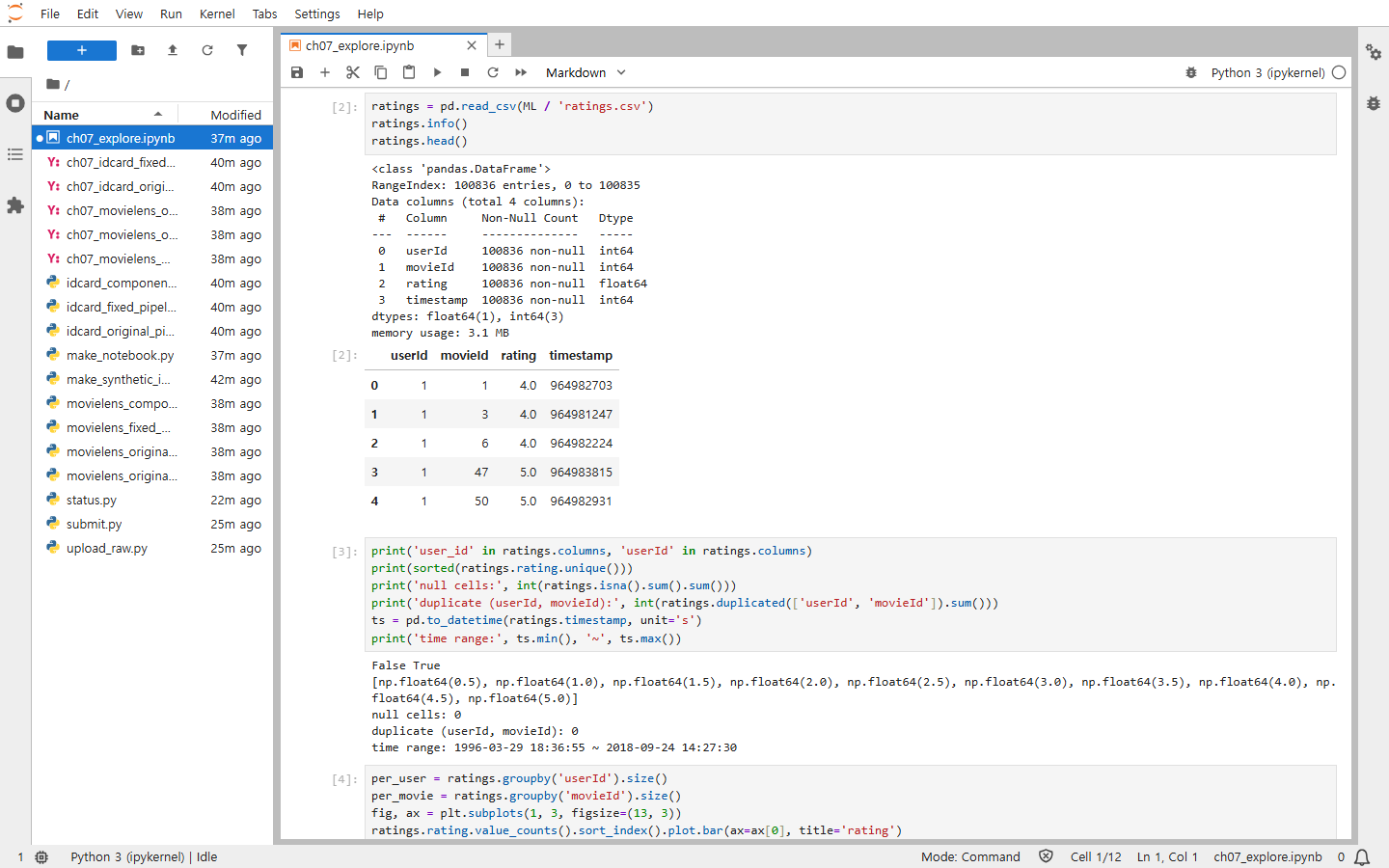
열 이름이
user_id가 아니라userId라는 점이 D-2에서 원본 분할이 실패하는 이유가 된다. 사용자당 평점 수는 최소 20, 중앙값 70.5, 최대 2,698개로 차이가 크다. 이 장의 무작위 분할은 이 차이를 반영하지 않는다.신분증 데이터는 이미지와 라벨이 같은 stem으로 짝을 이루는지, 박스가 객체를 감싸는지 본다.
imgs = os.listdir(IDC / 'images')
lbls = os.listdir(IDC / 'labels')
stem = lambda f: os.path.splitext(f)[0]
print(len(imgs), len(lbls), sorted({stem(f) for f in imgs} ^ {stem(f) for f in lbls}))

def show(stem_name, ax):
    img = Image.open(IDC / 'images' / f'{stem_name}.png').convert('RGB')
    w, h = img.size
    c, xc, yc, bw, bh = map(float, (IDC / 'labels' / f'{stem_name}.txt').read_text().split())
    ImageDraw.Draw(img).rectangle([(xc - bw / 2) * w, (yc - bh / 2) * h,
                                   (xc + bw / 2) * w, (yc + bh / 2) * h], outline=(255, 0, 0), width=3)
    ax.imshow(img); ax.set_title(stem_name); ax.axis('off')

fig, ax = plt.subplots(1, 3, figsize=(12, 3))
for a, s in zip(ax, ['clip01_frame001', 'clip01_frame002', 'clip05_frame001']):
    show(s, a)
120 120 []이 나오고 빨간 박스가 카드와 겹치면 YOLO의 정규화 중심 좌표를 맞게 읽은 것이다.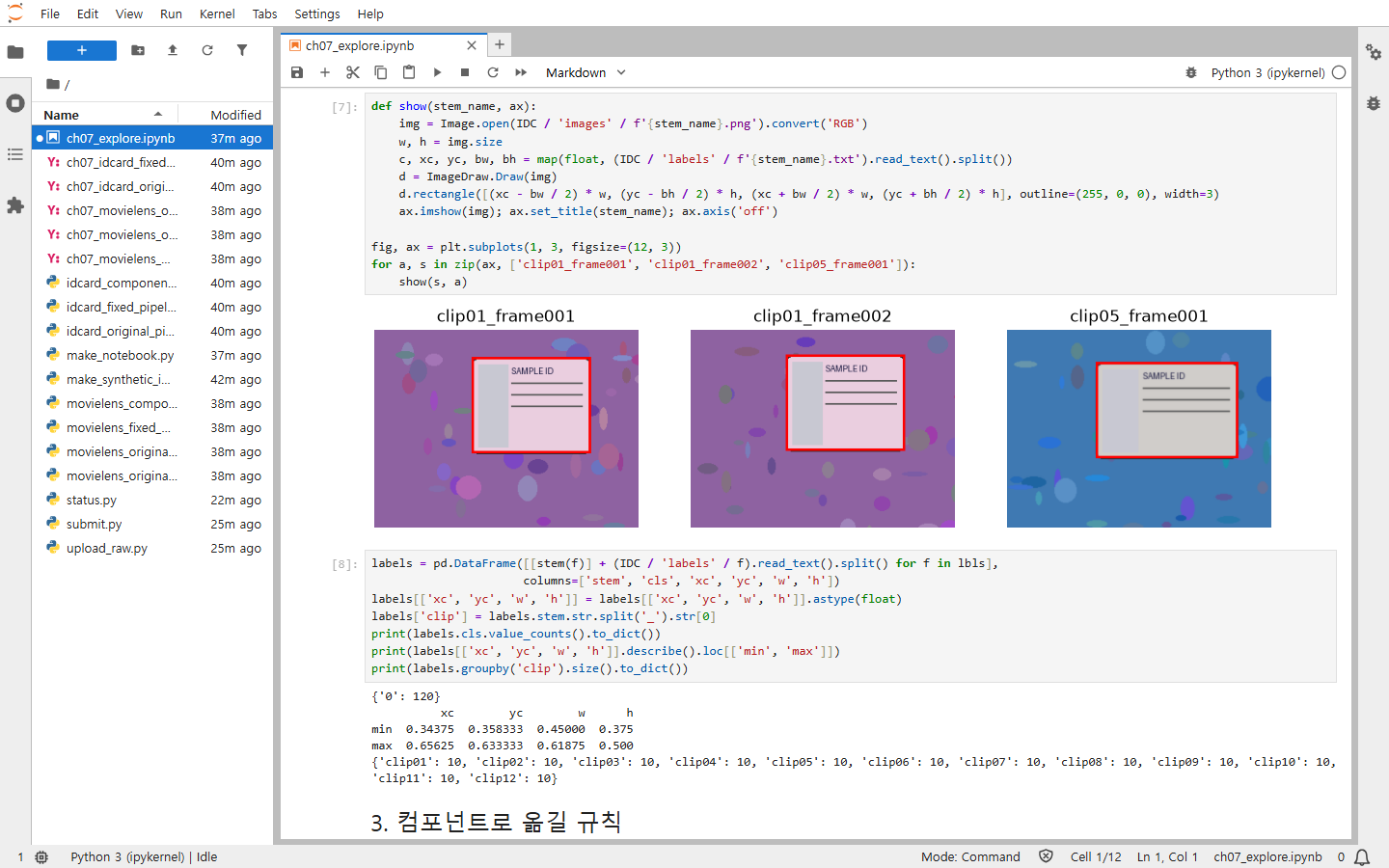
같은 clip의 두 프레임은 배경과 카드 위치가 거의 같다. 이런 프레임이 학습과 평가에 나뉘어 들어가면 평가가 쉬워진다. 이 관찰을 C-3의 분할 규칙으로 옮긴다.
여기까지 하면 노트북에 다섯 가지 규칙이 남는다. 열 이름, 평점 범위, 결측과 중복, 이미지와 라벨의 짝, 그룹 단위다. 다음 단계부터 이 규칙을 컴포넌트의 입력, 출력, 검사로 옮긴다.
A-5. 책의 Kubeflow 노트북에서 정하는 것
책처럼 Kubeflow Notebooks를 쓰면 노트북은 브라우저 화면이 아니라 자원과 저장소를 쓰는 워크로드가 된다. 이 실습에서는 만들지 않았지만, 다음 설정이 PC의 가상환경과 폴더 역할을 맡는다.
| 설정 | 확인할 내용 |
|---|---|
| 이미지 | Python, 데이터 라이브러리, OS 의존성과 버전 |
| Namespace | 서비스 계정, 네트워크 접근과 자원 할당 범위 |
| Workspace volume | 노트북 재시작 뒤에도 남길 코드와 작업 파일 |
| Data volume | 여러 작업이 읽을 데이터와 읽기 및 쓰기 권한 |
| PodDefault | 해당 설정을 적용하는 구성에서 공통 환경과 볼륨 주입 |
| Affinity / toleration | 자원에 맞는 노드 선택과 taint 허용 |
| GPU와 유휴 종료 | 탐색에 필요한 자원과 사용하지 않을 때 반환할 정책 |
toleration은 특정 taint를 허용할 뿐, 그 노드에 꼭 배치하라는 뜻은 아니다. 같은 이미지를 써도 데이터 버전, 설정, 숨은 셀 상태가 다르면 결과가 달라진다.
B. 파라미터와 아티팩트 전달
책은 데이터 준비에 앞서 작은 joke 파이프라인으로 두 전달 방식을 보여 준다. 전체 그림의 ③~⑧이다. 저자 저장소의 chapter_7\pipeline.py는 문자열과 정수를 파라미터로, chapter_7\generate_jokes_pipeline.py는 파일을 아티팩트로 넘긴다.
B-1. 두 파이프라인 컴파일
Push-Location upstream\object-detection-project\chapter_7
python pipeline.py
python generate_jokes_pipeline.py
Get-Item _pipeline.yaml, generate_jokes_pipeline.yaml
Pop-Location_pipeline.yaml과 generate_jokes_pipeline.yaml이 생기면 된다. 컴파일은 함수 본문을 실행하지 않는다. 각 컴포넌트의 이미지, 설치할 패키지, 입출력 타입을 YAML에 적을 뿐이다. 기본 이미지를 지정하지 않은 컴포넌트에서 python:3.9 기본값 경고가 나오지만 실행에는 지장이 없었다.
B-2. 업로드와 실행
KFP 화면에서 올려도 되지만 이 장은 파이프라인이 일곱 개라서, 4장 D-5의 화면 절차 대신 SDK로 올리는 스크립트를 쓴다. ch07\submit.py로 저장한다.
"""Uploads a compiled pipeline to KFP and starts one run in the ch07 experiment."""

import argparse


import kfp


p = argparse.ArgumentParser()

p.add_argument("yaml")

p.add_argument("name")

p.add_argument("--run", required=True)

a = p.parse_args()


client = kfp.Client(host="http://127.0.0.1:8080")

pid = client.get_pipeline_id(a.name)

if pid is None:

    pipeline = client.upload_pipeline(a.yaml, pipeline_name=a.name)

    pid = pipeline.pipeline_id

    version_id = client.list_pipeline_versions(pid).pipeline_versions[0].pipeline_version_id

else:

    version_id = client.upload_pipeline_version(a.yaml, pipeline_version_name=a.run, pipeline_id=pid).pipeline_version_id

exp = client.create_experiment("ch07-data-prep")

run = client.run_pipeline(experiment_id=exp.experiment_id, job_name=a.run, pipeline_id=pid, version_id=version_id)

print("run", run.run_id)

print(f"http://127.0.0.1:8080/#/runs/details/{run.run_id}")
python ch07\submit.py upstream\object-detection-project\chapter_7\_pipeline.yaml ch07-joke-parameters --run ch07-joke-parameters-1
python ch07\submit.py upstream\object-detection-project\chapter_7\generate_jokes_pipeline.yaml ch07-joke-artifacts --run ch07-joke-artifacts-1출력된 주소를 열면 실행 화면이 나온다. 두 실행 모두 2분 안팎에 끝났다. 첫 실행은 작업 Pod가 python:3.11 이미지를 받고 pyjokes를 설치하느라 더 걸릴 수 있다.
docker.io에서 이미지를 받다가 시간 초과가 반복되면 PC에서 받아 kind 노드에 넣는다. kind load docker-image가 content digest ... not found로 실패하면 플랫폼을 지정해 저장한 파일로 적재한다.
docker pull python:3.11
docker save --platform linux/amd64 python:3.11 -o python311.tar
kind load image-archive python311.tar --name book-env
Remove-Item python311.tar
B-3. 파라미터 전달 확인
ch07-joke-parameters-1에서 count-words → Input/Output을 연다.
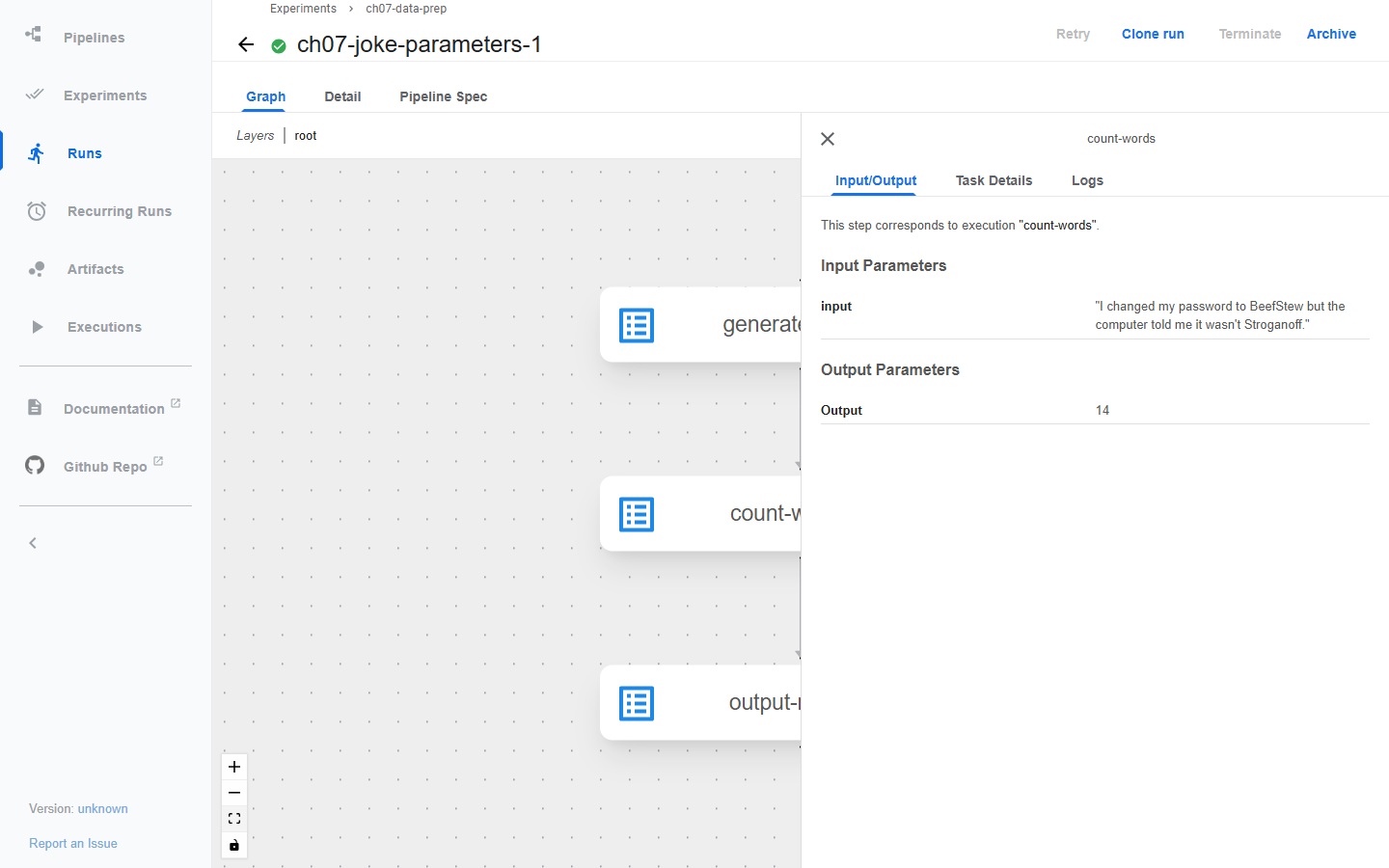
앞 작업이 반환한 농담 문자열이 input 파라미터에 그대로 보이고, 결과 14는 Output Parameters에 남는다. 값이 실행 기록에 직접 저장되니 작은 설정과 결과에 알맞다. 10GB 데이터셋을 이렇게 넘길 수는 없다.
B-4. 아티팩트 전달과 .path, .uri
ch07-joke-artifacts-1의 그래프를 본다. 작업 사이에 노란 폴더 모양의output_jokes아티팩트가 생긴다.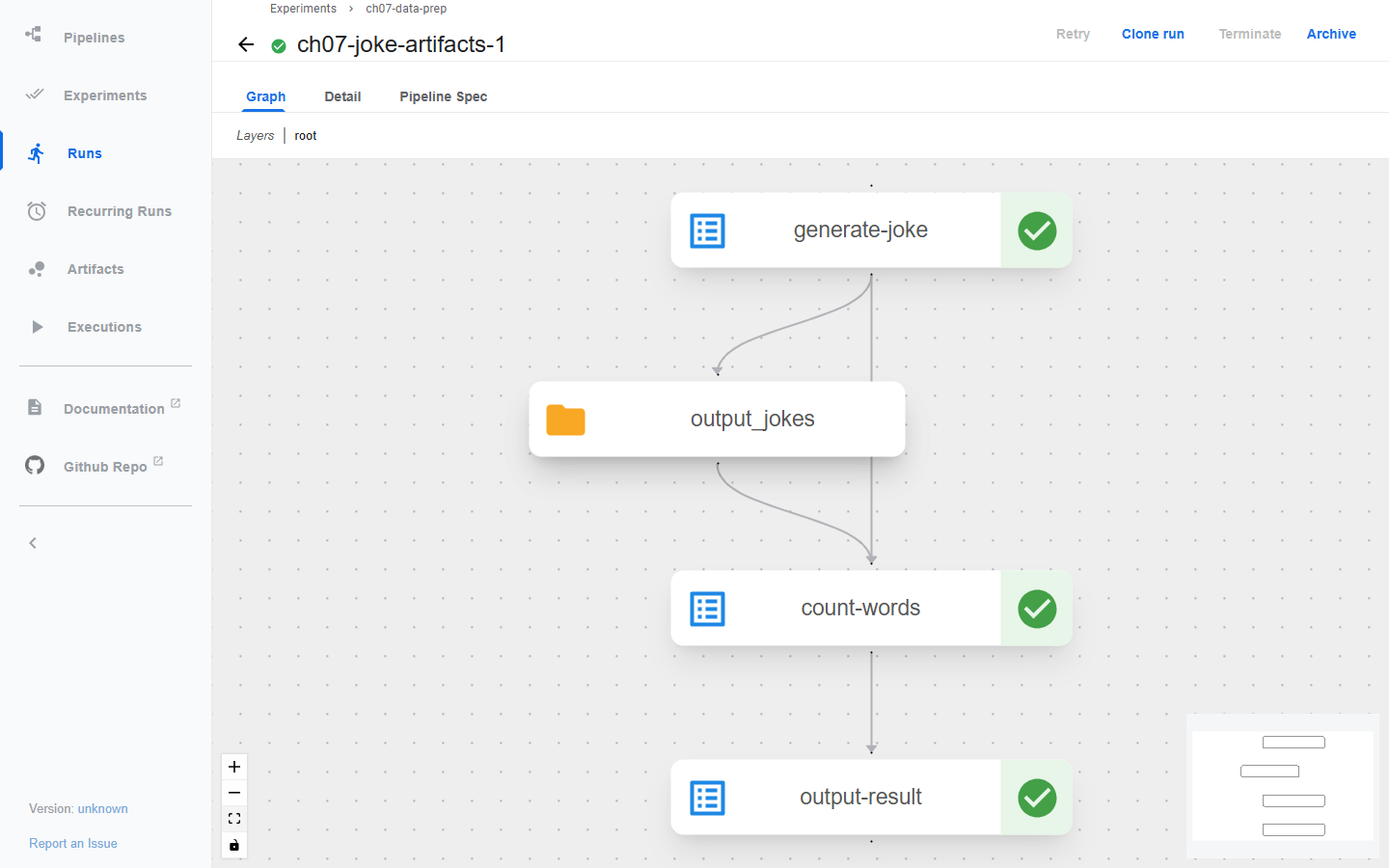
count-words → Input/Output을 연다.
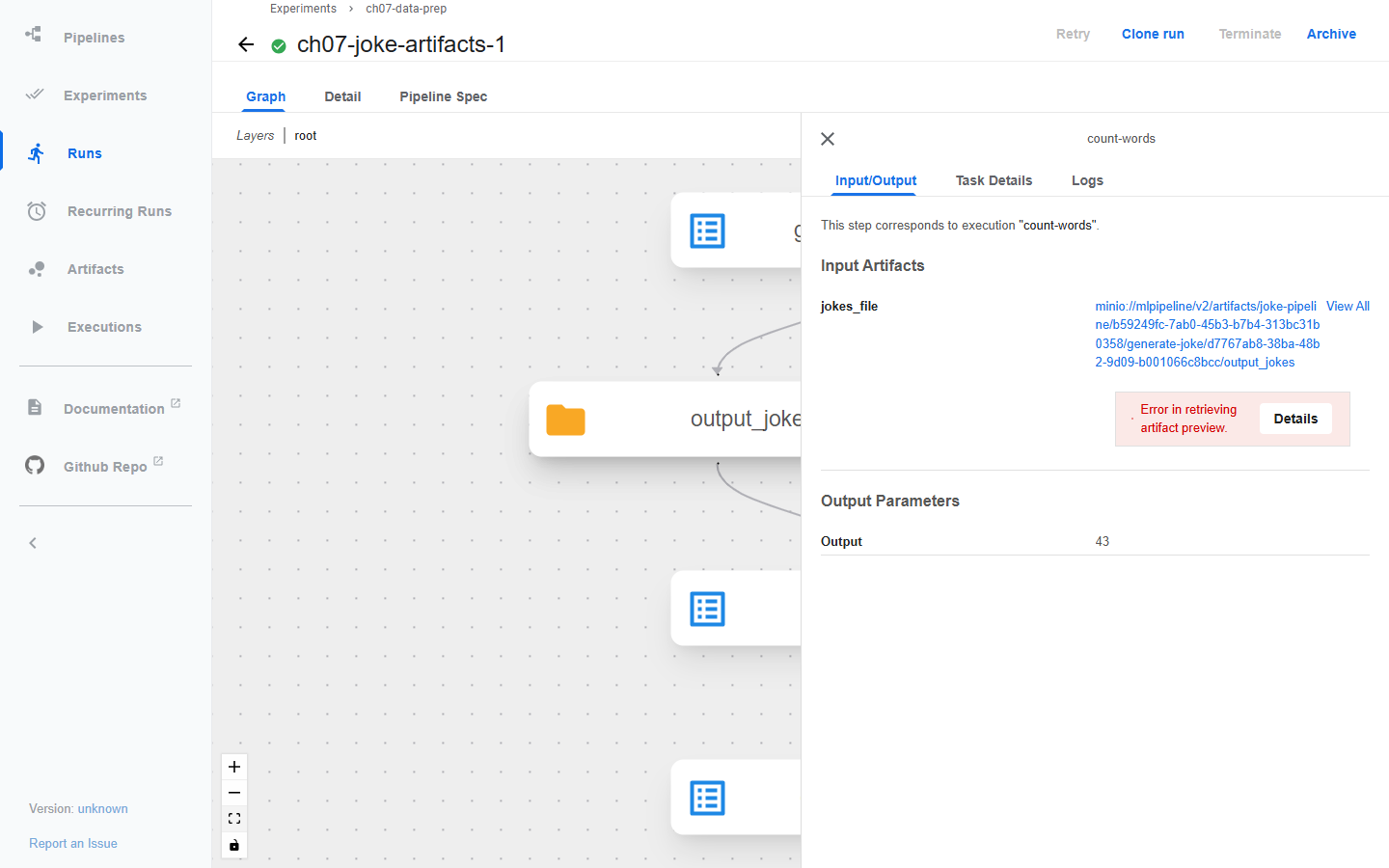
Input Artifacts에 보이는 것은 내용이 아니라
minio://mlpipeline/v2/artifacts/joke-pipeline/<run_id>/generate-joke/<id>/output_jokes주소다. 이것이 아티팩트의.uri다.Error in retrieving artifact preview는 화면이 미리보기를 만들지 못했다는 뜻이고, 전달 실패와는 관계가 없다. 이 아티팩트는jokes.txt를 담은 폴더이고, 작업이 이 주소의 파일을 읽어 세 농담의 단어 수43을 Output Parameters에 남겼으니 전달은 성공했다.
코드에서 쓰는 .path는 Pod 안의 로컬 경로다. C-3의 실제 로그를 보면 같은 아티팩트가 다음처럼 두 이름을 가진다.
.path  /minio/mlpipeline/v2/artifacts/ch07-idcard-prep-fixed/d55c041d-.../download-dataset-from-s3/453d4471-.../output_dataset
.uri   minio://mlpipeline/v2/artifacts/ch07-idcard-prep-fixed/d55c041d-.../split-dataset-by-stem/1afb190a-.../train_dataset
    sequenceDiagram
    accTitle: 데이터 준비 컴포넌트 사이의 아티팩트 전달
    accDescr: KFP는 분할 시드 같은 작은 값을 파라미터로 전달한다. 다운로드 Pod가 출력 경로에 기록한 파일은 아티팩트 저장소를 거쳐 다음 Pod의 입력 경로에 연결된다.
    participant K as KFP
    participant A as 다운로드 Pod
    participant S as 아티팩트 저장소
    participant B as 변환과 분할 Pod
    K->>A: 원천과 실행 설정
    A->>A: Output의 path에 파일 기록
    A->>S: 아티팩트 저장
    K->>B: 분할 시드와 입력 아티팩트 참조
    S->>B: Input의 path로 파일 제공
    B->>B: 입력을 읽고 새 출력 작성
| 전달 방식 | 적합한 것 | 확인할 조건 |
|---|---|---|
| 파라미터 | seed, 버킷 이름, 원천 버전 같은 작은 설정 | 값의 타입과 의미 |
| KFP 아티팩트 | 데이터셋, 파일 묶음, 모델, 평가 보고서 | 선언한 출력 경로에 실제 파일을 썼는지 |
| S3 URI | 장기 보관할 업무 데이터의 위치 | 다음 작업의 주소, 권한과 객체 버전 |
| 공유 볼륨 | 명시적으로 마운트한 공통 파일 | PVC, 접근 모드, 마운트 경로와 동시 쓰기 |
KFP가 정한 output.path와 s3://datasets/ml-latest-small/train.parquet.gzip은 역할이 다른 경로다. 앞의 것은 실행 사이의 산출물 연결이고, 뒤의 것은 코드가 boto3로 직접 올린 장기 보관 위치다. Input[Dataset]은 입력의 의도를 나타낼 뿐 CSV 열이나 YOLO 라벨을 검증하지 않는다. 내용 검사는 C와 D의 QA 컴포넌트가 맡는다.
B를 마치면 실험 ch07-data-prep에 성공한 실행 두 개가 남는다. 파라미터는 값으로, 아티팩트는 주소로 기록된다는 차이를 화면으로 본 셈이다.
C. 신분증 탐지 데이터 준비
여기서부터는 전체 그림의 ⑤~⑩을 신분증 데이터로 지난다.
    flowchart LR
    accTitle: 신분증 이미지와 라벨의 데이터 준비
    accDescr: 압축 데이터를 다운로드하고 해제한 뒤 이미지와 라벨의 대응을 확인한다. 분할 컴포넌트는 학습, 검증, 테스트 아티팩트를 만들고 각 아티팩트 안에 images와 labels를 둔다.
    A["원천 압축 파일"] --> B["다운로드와 해제"]
    B --> C["이미지와 라벨 대응 확인"]
    C --> D["분할 컴포넌트"]
    D --> T["train_dataset<br/>images와 labels"]
    D --> V["validation_dataset<br/>images와 labels"]
    D --> E["test_dataset<br/>images와 labels"]
객체 탐지 저장소의 루트 data_prep_pipeline.py에 다운로드, 분할, 파일 목록 출력 컴포넌트가 함께 들어 있다. data_preparation 폴더에는 /mnt/pipeline을 쓰는 다른 코드도 있으니 두 경로를 섞지 않는다. 이 진입점은 배포된 압축 파일을 받아 나눌 뿐, 원천 MIDV 주석을 YOLO 형식으로 바꾸지 않는다. 그 변환은 저자가 미리 해 두었다고 책도 설명한다.
C-1. 원천 올리기와 다운로드 컴포넌트 교체
A-3에서 만든 압축 파일을
ch07-raw버킷에 올린다.ch07\upload_raw.py로 저장하고 실행한다."""Uploads the synthetic ID-card archive to s3://ch07-raw through the forwarded S3 port.""" import boto3 from botocore.exceptions import ClientError s3 = boto3.client("s3", endpoint_url="http://127.0.0.1:9000", aws_access_key_id="minio", aws_secret_access_key="minio123") try: s3.head_bucket(Bucket="ch07-raw") except ClientError: s3.create_bucket(Bucket="ch07-raw") s3.upload_file("data/synthetic-idcards.tar.gz", "ch07-raw", "synthetic-idcards.tar.gz") for obj in s3.list_objects_v2(Bucket="ch07-raw")["Contents"]: print(obj["Key"], obj["Size"])python ch07\upload_raw.pysynthetic-idcards.tar.gz 828926
저자의
download_dataset에서 Box 주소로 받던 부분만 S3로 바꾼다. 압축 해제 위치(output_dataset.path/DATASET)는 그대로 두어 저자의split_dataset이 같은 경로를 찾게 한다. 해제할 때는 경로 밖으로 쓰지 못하게filter="data"를 붙였다. 파일의 나머지 두 컴포넌트는 C-2와 C-3에서 쓴다.ch07\idcard_components.py로 저장한다.from kfp import dsl from kfp.dsl import Dataset, Input, Metrics, Output S3_ENDPOINT = "http://minio-service.kubeflow:9000" @dsl.component(base_image="python:3.11", packages_to_install=["boto3"]) def download_dataset_from_s3( output_dataset: Output[Dataset], source_bucket: str = "ch07-raw", source_key: str = "synthetic-idcards.tar.gz", output_dir: str = "DATASET", ): """Replaces the author's Box download, which now returns 404.""" import os import tarfile import boto3 s3 = boto3.client("s3", endpoint_url="http://minio-service.kubeflow:9000", aws_access_key_id="minio", aws_secret_access_key="minio123") s3.download_file(source_bucket, source_key, "DATASET.gz") extraction_path = os.path.join(output_dataset.path, output_dir) os.makedirs(extraction_path, exist_ok=True) with tarfile.open("DATASET.gz", "r:gz") as tar: tar.extractall(extraction_path, filter="data") for root, _, files in os.walk(extraction_path): if files: print(root, len(files), "files") @dsl.component(base_image="python:3.11") def check_split_pairs( train_dataset: Input[Dataset], validation_dataset: Input[Dataset], test_dataset: Input[Dataset], report: Output[Metrics], fail_on_error: bool = True, ): """Checks every split: image/label pairing by stem, YOLO format, clip leakage.""" import os def labels_in(path): return {os.path.splitext(f)[0]: os.path.join(path, f) for f in os.listdir(path)} errors, clips = [], {} for name, ds in [("train", train_dataset), ("validation", validation_dataset), ("test", test_dataset)]: imgs = labels_in(os.path.join(ds.path, "images")) lbls = labels_in(os.path.join(ds.path, "labels")) unmatched = sorted(set(imgs) ^ set(lbls)) bad = 0 for stem, path in lbls.items(): for line in open(path).read().splitlines(): parts = line.split() if len(parts) != 5 or parts[0] != "0" or not all(0 <= float(v) <= 1 for v in parts[1:]): bad += 1 clips[name] = {s.split("_")[0] for s in imgs} print(f"{name}: images={len(imgs)} labels={len(lbls)} unmatched={len(unmatched)} bad_label_lines={bad}") if unmatched: print(" e.g.", unmatched[:4]) report.log_metric(f"{name}_images", len(imgs)) report.log_metric(f"{name}_unmatched", len(unmatched)) if unmatched or bad: errors.append(f"{name}: {len(unmatched)} unmatched, {bad} bad lines") for a, b in [("train", "validation"), ("train", "test"), ("validation", "test")]: shared = sorted(clips[a] & clips[b]) print(f"clips shared by {a} and {b}: {len(shared)} {shared[:6]}") report.log_metric(f"shared_clips_{a}_{b}", len(shared)) if shared: errors.append(f"{a}/{b} share clips {shared[:6]}") if errors and fail_on_error: raise SystemExit("QA failed: " + "; ".join(errors)) print("QA passed" if not errors else "QA found problems (not failing)") @dsl.component(base_image="python:3.11") def split_dataset_by_stem( random_state: int, input_dataset: Input[Dataset], train_dataset: Output[Dataset], validation_dataset: Output[Dataset], test_dataset: Output[Dataset], base_path: str = "MINIDATA", ): """Pairs files by stem before splitting and keeps each clip in one split.""" import os import random import shutil root = os.path.join(input_dataset.path, "DATASET", base_path) imgs = {os.path.splitext(f)[0]: f for f in os.listdir(os.path.join(root, "images"))} lbls = {os.path.splitext(f)[0]: f for f in os.listdir(os.path.join(root, "labels"))} missing = sorted(set(imgs) ^ set(lbls)) if missing: raise SystemExit(f"image/label stems do not match: {missing[:10]}") clips = sorted({s.split("_")[0] for s in imgs}) random.Random(random_state).shuffle(clips) n_train = round(len(clips) * 0.75) n_val = round(len(clips) * 0.15) parts = [clips[:n_train], clips[n_train:n_train + n_val], clips[n_train + n_val:]] for out, chosen in zip([train_dataset, validation_dataset, test_dataset], parts): os.makedirs(os.path.join(out.path, "images"), exist_ok=True) os.makedirs(os.path.join(out.path, "labels"), exist_ok=True) stems = sorted(s for s in imgs if s.split("_")[0] in chosen) for s in stems: shutil.copy2(os.path.join(root, "images", imgs[s]), os.path.join(out.path, "images", imgs[s])) shutil.copy2(os.path.join(root, "labels", lbls[s]), os.path.join(out.path, "labels", lbls[s])) print(f"{out.uri}: {len(stems)} pairs from clips {sorted(chosen)}")
check_split_pairs는 train만 출력하던 저자의 output_file_contents를 대신한다. 세 분할 모두에서 이미지와 라벨의 stem 대응, YOLO 라벨의 다섯 항목과 0~1 범위, 같은 clip이 두 분할에 걸쳤는지를 검사하고 결과를 Metrics로 남긴다.
C-2. 저자의 분할을 그대로 실행
다운로드만 바꾸고 저자의
split_dataset과output_file_contents는 그대로 가져온 파이프라인을 만든다.ch07\idcard_original_pipeline.py로 저장한다."""Author's split_dataset unchanged; only the Box download is replaced by S3.""" import sys from pathlib import Path from kfp import compiler, dsl sys.path.insert(0, str(Path(__file__).resolve().parents[1] / "upstream" / "object-detection-project")) from data_prep_pipeline import output_file_contents, split_dataset # noqa: E402 from idcard_components import check_split_pairs, download_dataset_from_s3 # noqa: E402 @dsl.pipeline(name="ch07-idcard-original-split") def pipeline(random_state: int = 42): download_op = download_dataset_from_s3() split_op = split_dataset(random_state=random_state, input_dataset=download_op.outputs["output_dataset"]) output_file_contents(dataset=split_op.outputs["train_dataset"]) check_split_pairs( train_dataset=split_op.outputs["train_dataset"], validation_dataset=split_op.outputs["validation_dataset"], test_dataset=split_op.outputs["test_dataset"], ) if __name__ == "__main__": compiler.Compiler().compile(pipeline, "ch07_idcard_original.yaml")컴파일하고 실행한다.
Push-Location ch07
python idcard_original_pipeline.py
Pop-Location
python ch07\submit.py ch07\ch07_idcard_original.yaml ch07-idcard-original-split --run ch07-idcard-original-1
약 3분 뒤 그래프를 보면
split-dataset은 성공하고check-split-pairs만 빨간색으로 끝난다.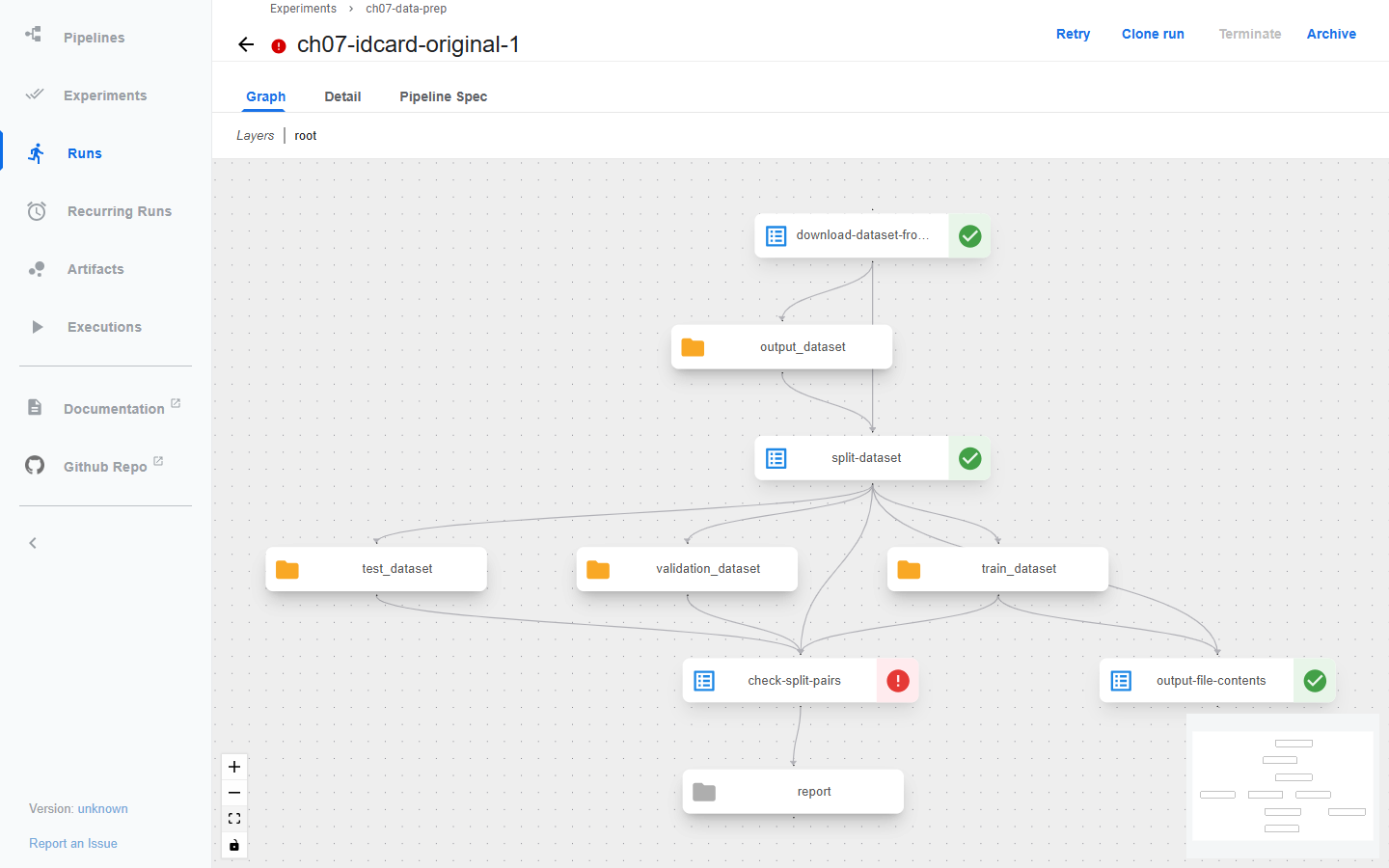
check-split-pairs → Logs를 연다.
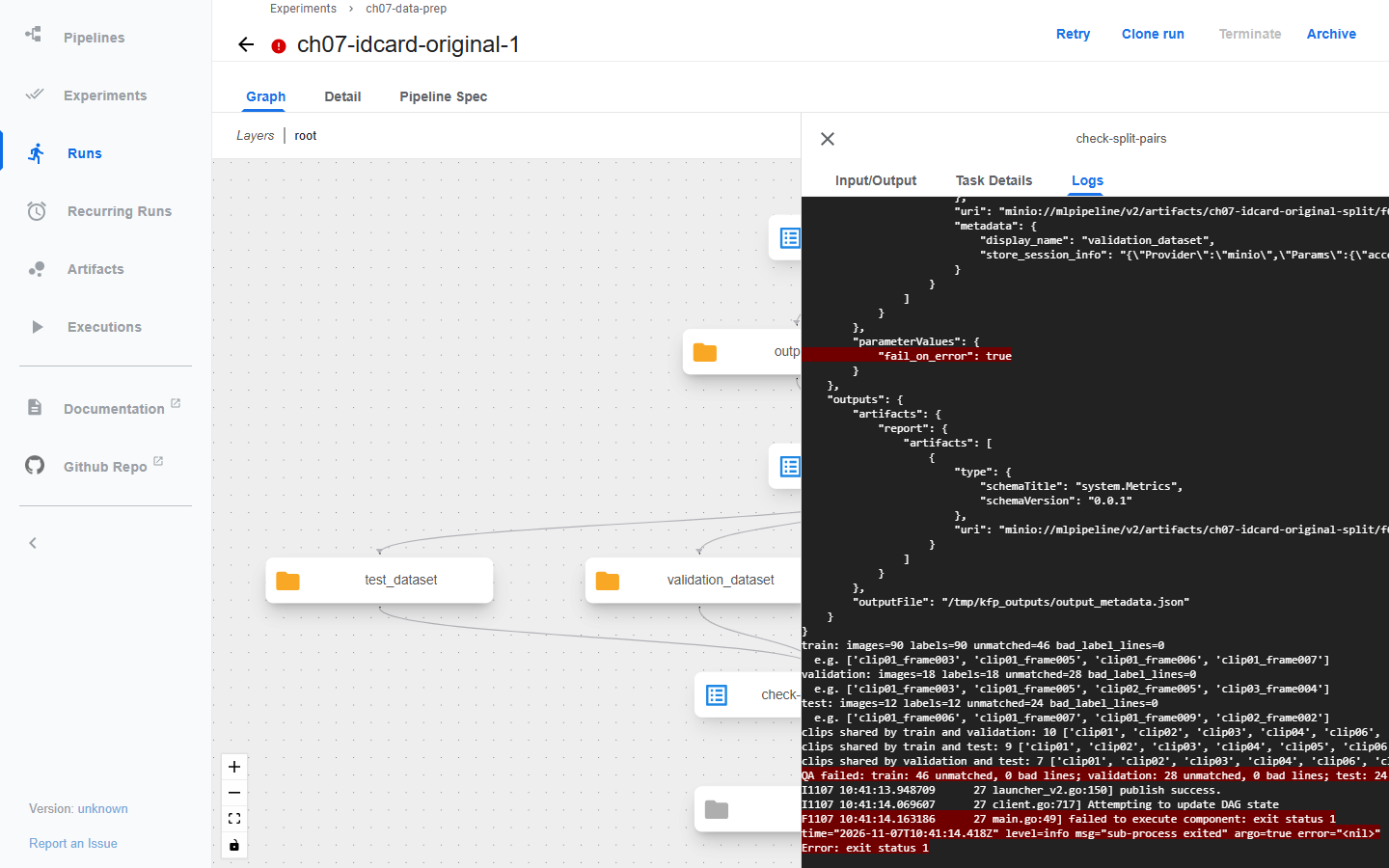
train: images=90 labels=90 unmatched=46 bad_label_lines=0
validation: images=18 labels=18 unmatched=28 bad_label_lines=0
test: images=12 labels=12 unmatched=24 bad_label_lines=0
clips shared by train and validation: 10 [...]
clips shared by train and test: 9 [...]
clips shared by validation and test: 7 [...]
분할마다 이미지와 라벨 수는 같다. 그런데 train의 이미지 90장 중 23장은 자기 라벨이 다른 분할로 갔고, 그 자리에 다른 이미지의 라벨 23개가 들어왔다. unmatched=46은 짝 없는 이미지와 라벨 stem을 더한 수다.
원인은 목록을 만드는 방식에 있다. 원본은 glob으로 이미지 목록과 라벨 목록을 따로 만든 뒤 같은 random_state로 나눈다. 그런데 glob은 파일을 이름순으로 정렬하지 않는다. 이번 Linux 컨테이너에서는 두 폴더의 나열 순서가 서로 달라, 같은 위치의 이미지와 라벨이 같은 표본이 아니게 됐다. Windows의 탐색 노트북에서는 두 목록이 모두 이름순으로 나와 문제가 보이지 않았다. PC에서 멀쩡하던 코드가 컨테이너에서만 어긋난 것이다. 파일 수만 출력하는 저자의 output_file_contents는 성공으로 끝났다.
라벨 형식 오류(bad_label_lines)는 0이니 형식 검사로는 이 문제를 잡을 수 없다. 이대로 학습하면 실행은 되지만 다른 이미지의 박스를 정답으로 배운다. clip 중복은 무작위 분할의 결과로, 같은 영상의 인접 프레임이 학습과 평가에 함께 들어갔다는 뜻이다.
C-3. stem으로 짝짓고 clip 단위로 나누기
C-1 파일의
split_dataset_by_stem은 다음 순서로 동작한다.단계 원본 수정 짝짓기 이미지와 라벨 목록을 따로 globstem을 키로 묶고 짝이 없으면 중단 분할 단위 파일 하나 clip 하나 비율 파일 수 기준 75/15/10 clip 12개를 반올림해 9/2/1 검사 train 파일 목록 출력 세 분할의 짝, 라벨 형식, clip 중복 수정 파이프라인을 만든다.
ch07\idcard_fixed_pipeline.py로 저장한다."""Fixed ID-card preparation: stem pairing, clip-level split, QA on all splits.""" from kfp import compiler, dsl from idcard_components import check_split_pairs, download_dataset_from_s3, split_dataset_by_stem @dsl.pipeline(name="ch07-idcard-prep-fixed") def pipeline(random_state: int = 42): download_op = download_dataset_from_s3() split_op = split_dataset_by_stem(random_state=random_state, input_dataset=download_op.outputs["output_dataset"]) check_split_pairs( train_dataset=split_op.outputs["train_dataset"], validation_dataset=split_op.outputs["validation_dataset"], test_dataset=split_op.outputs["test_dataset"], ) if __name__ == "__main__": compiler.Compiler().compile(pipeline, "ch07_idcard_fixed.yaml")컴파일하고 실행한다.
Push-Location ch07
python idcard_fixed_pipeline.py
Pop-Location
python ch07\submit.py ch07\ch07_idcard_fixed.yaml ch07-idcard-prep-fixed --run ch07-idcard-fixed-1
약 2분 뒤 세 작업이 모두 초록색이 된다.
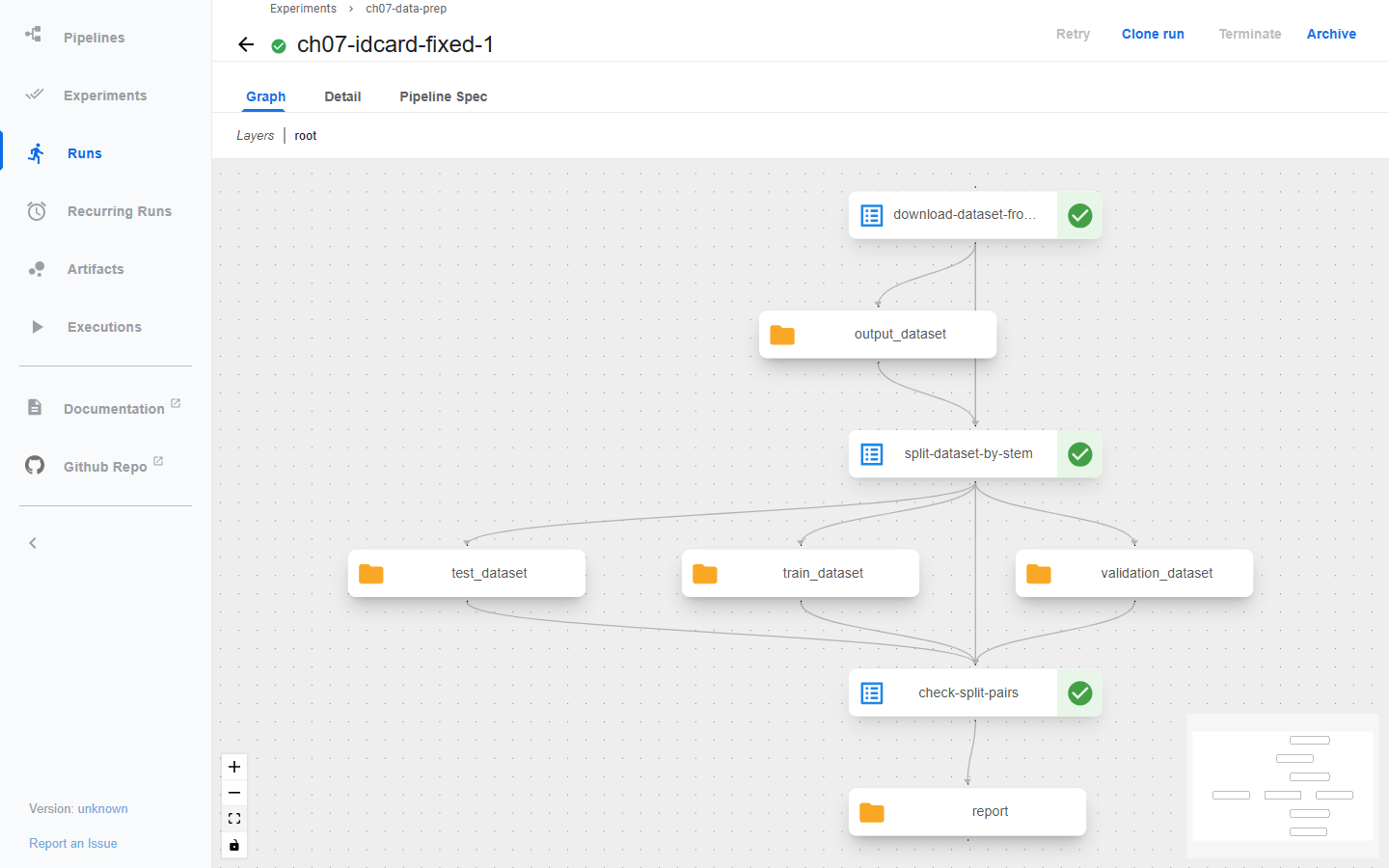
split-dataset-by-stem → Input/Output에서 입력 하나와 출력 세 개의 주소를 확인한다.
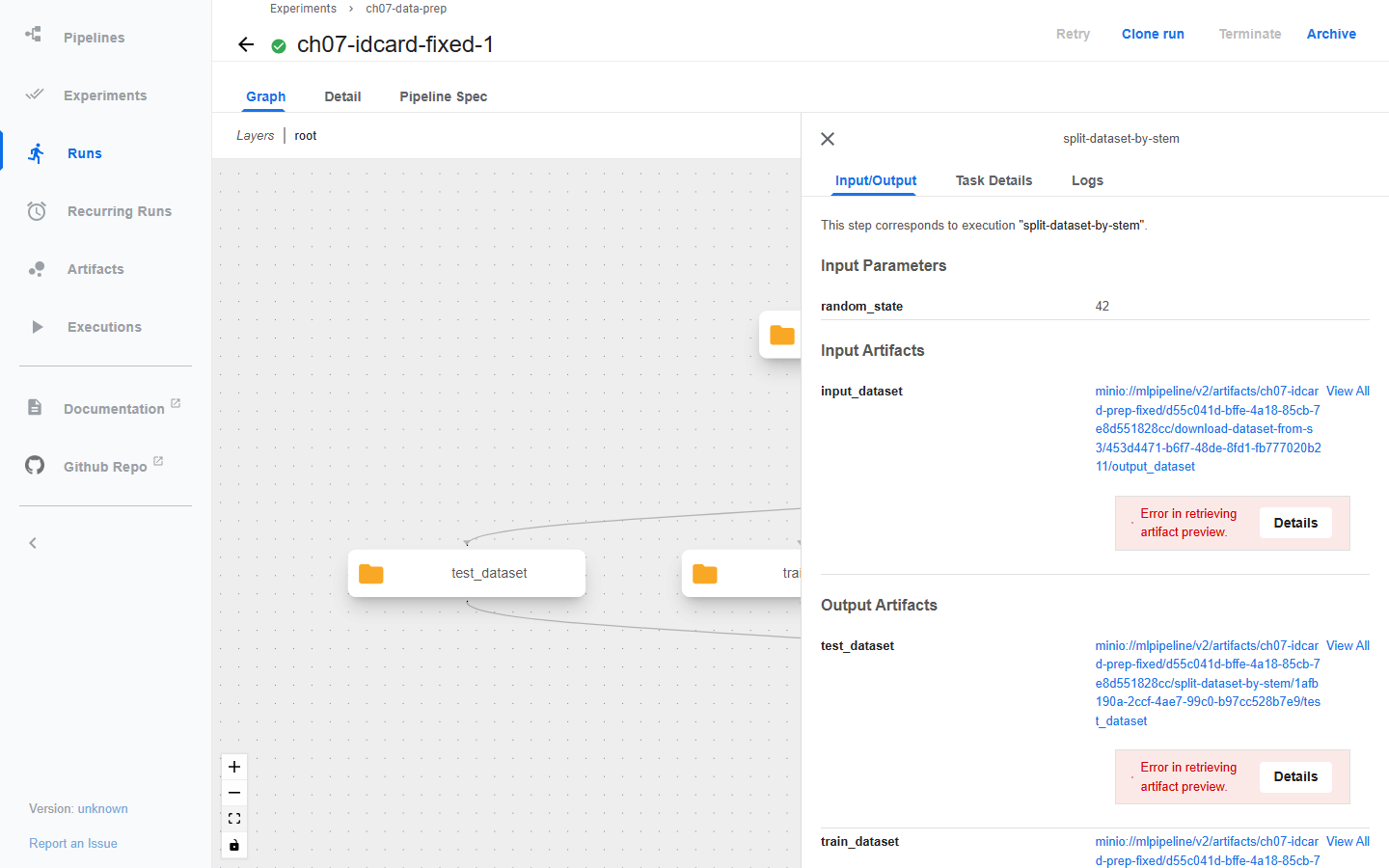
같은 작업의 Logs에는 분할마다 어떤 clip이 들어갔는지 나온다.
.../train_dataset: 90 pairs from clips ['clip03', 'clip04', 'clip05', 'clip06', 'clip07', 'clip08', 'clip09', 'clip10', 'clip12']
.../validation_dataset: 20 pairs from clips ['clip01', 'clip02']
.../test_dataset: 10 pairs from clips ['clip11']
check-split-pairs → Logs에서
QA passed를 확인한다.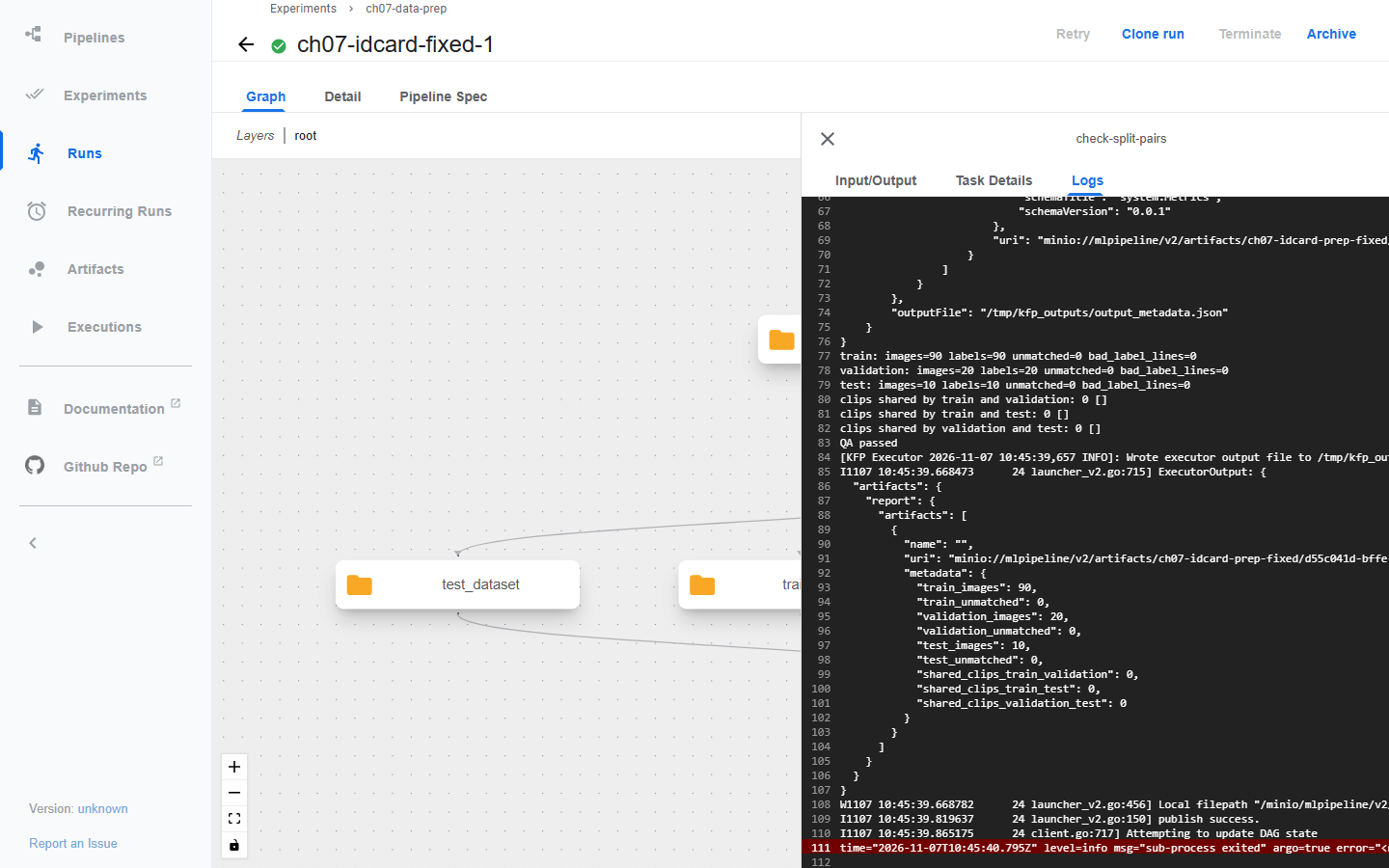
저장소 화면에서 출력 아티팩트의
.uri가 실제 폴더임을 확인한다. http://localhost:8888/buckets/mlpipeline/v2/artifacts/ch07-idcard-prep-fixed/ 아래에서 실행 ID와split-dataset-by-stem폴더로 들어간다.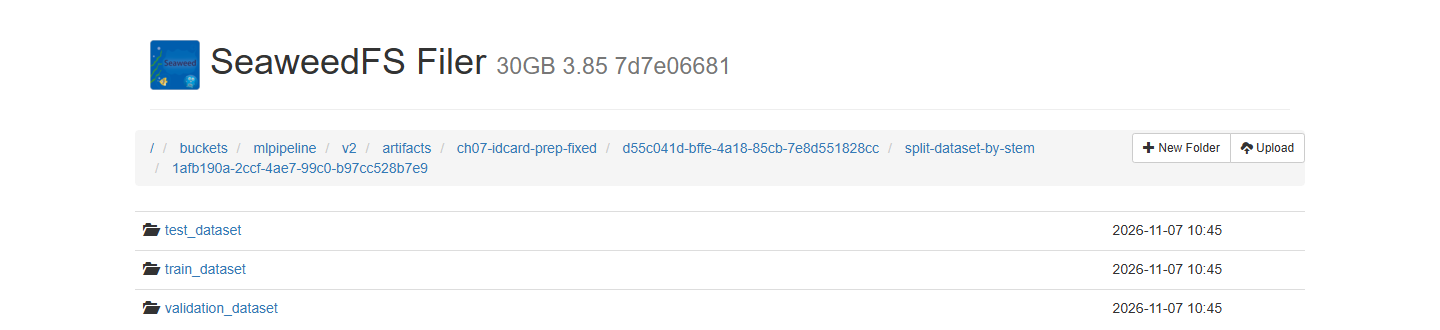
각 폴더 안에
images와labels가 있다. 책 목록 7.10의 YOLO 구조와 같고, 8장의 학습 작업이 이 세 아티팩트를 입력으로 받는다.
C를 마치면 짝이 맞고 clip이 섞이지 않은 train 90장, validation 20장, test 10장이 KFP 아티팩트로 남는다. 합성 데이터 120장은 파이프라인 동작을 확인하는 용도다. 이 데이터로 학습한 탐지 성능을 실제 신분증 탐지 성능으로 읽으면 안 된다.
C-4. 실제 데이터에서 분할 전에 확인할 것
| 검사 | 확인 방법 |
|---|---|
| 파일 대응 | 이미지와 라벨을 파일명 stem으로 연결 |
| 중복과 누락 | 중복 stem, 라벨 없는 이미지, 이미지 없는 라벨 탐지 |
| 라벨 형식 | 클래스 ID와 좌표 항목의 개수, 타입 확인 |
| 좌표 의미 | YOLO의 정규화된 중심 좌표, 너비, 높이인지 확인 |
| 데이터 단위 | 문서, 사람, 촬영 영상 등 동일 원천의 그룹 기록 |
| 샘플 표시 | 이미지 위에 박스를 그려 위치와 클래스 확인 |
YOLO 박스라면 클래스 ID, 중심 좌표 x와 y, 너비, 높이의 의미와 범위를 확인한다. 좌상단과 우하단 좌표를 그대로 넣거나 픽셀 값을 정규화 값처럼 다루면, 학습은 돌아가도 다른 박스를 배운다. 배경만 있는 이미지를 허용한다면 빈 라벨 파일과 라벨 누락을 가르는 규칙도 필요하다. 이번 검사는 빈 라벨을 오류로 보지 않으니, 실제 데이터에서는 이 조건을 더한다.
D. MovieLens 평점 데이터 준비
같은 ⑤~⑩ 구간을 이번에는 추천 데이터로 지난다.
D-1. 컴포넌트와 데이터 규모
영화 추천 프로젝트는 MovieLens의 ratings.csv와 movies.csv를 읽는다. 데이터 준비는 모델 학습과 분리된 별도 파이프라인이다.
    flowchart LR
    accTitle: 영화 평점 데이터의 변환과 분할
    accDescr: MovieLens 압축 파일을 내려받아 ratings와 movies CSV를 분리한다. ratings는 Parquet으로 변환해 세 분할로 나누고 movies와 함께 S3에 업로드한다. QA는 두 업로드가 끝난 뒤 네 파일을 읽는다.
    DL["MovieLens ZIP 다운로드"] --> UN["압축 해제"]
    UN --> R["ratings.csv"]
    UN --> M["movies.csv"]
    R --> RP["Parquet 변환"]
    RP --> SP["75/15/10 무작위 분할"]
    SP --> UP["분할 파일 업로드"]
    M --> MP["Parquet 변환과 업로드"]
    UP --> S3[("datasets/ml-latest-small")]
    MP --> S3
    UP --> QA["네 파일 QA"]
    MP --> QA
저자의 컴포넌트는 data_components\dataset_preparation.py에 있다.
| 컴포넌트 | 입력과 출력 | 이 실습에서 |
|---|---|---|
download_ml25m_data | GroupLens ZIP을 출력 아티팩트에 기록 | 데이터셋 이름을 파라미터로 바꾼 download_movielens |
unzip_data | ZIP에서 ratings와 movies를 별도 CSV로 분리 | 폴더 이름을 파라미터로 바꾼 unzip_movielens |
csv_to_parquet | CSV를 gzip 압축 Parquet으로 변환 | 그대로 사용 |
split_dataset | ratings를 train, val, test 파일로 작성 | D-2에서 실패 확인 후 split_ratings |
put_to_minio | 업무용 버킷의 ml-25m 경로에 업로드 | 경로를 파라미터로 바꾼 put_to_s3 |
qa_data | 업로드된 train Parquet의 열 수와 행 수 확인 | D-4에서 실패 확인 후 qa_movielens |
25M은 평점 2,500만 개에 압축 파일만 약 261MB다. 해제한 CSV, Parquet, 세 분할을 Pod 안에서 pandas로 메모리에 올리니 공유 kind 클러스터에는 부담이 크다. 그래서 같은 열 구조의 ml-latest-small(평점 100,836개, 사용자 610명, 영화 9,742편)을 쓴다. 작은 자료는 평점 시점과 사용자 구성이 달라서 여기서 나온 수치를 25M의 결과로 읽지 않는다. 파이프라인 동작과 검사 조건을 확인하는 데만 쓴다. 저장 위치도 ml-25m 대신 datasets/ml-latest-small/로 나눠 다른 데이터와 섞이지 않게 했다.
Parquet은 저장 형식이지 분할 정책이 아니다. 압축과 열 단위 읽기가 편해도 데이터 누수나 식별자 오류를 해결해 주지는 않는다.
D-2. 저자의 분할을 그대로 실행
수정 컴포넌트 파일부터 만든다. 다운로드와 해제는 데이터셋 이름만 파라미터로 바꿨다. TLS 검증을 끄던
verify=False는 없애고, HTTP 상태 확인과 sha256 기록을 넣었다.ch07\movielens_components.py로 저장한다.from kfp import dsl from kfp.dsl import Artifact, Input, Metrics, Output @dsl.component(base_image="python:3.11", packages_to_install=["requests"]) def download_movielens(output_path_one: Output[Artifact], dataset: str = "ml-latest-small"): """Author's download with the dataset name as a parameter and TLS verification on.""" import hashlib import requests url = f"https://files.grouplens.org/datasets/movielens/{dataset}.zip" response = requests.get(url, stream=True, timeout=60) response.raise_for_status() digest = hashlib.sha256() with open(output_path_one.path, "wb") as file: for chunk in response.iter_content(chunk_size=1024 * 1024): if chunk: file.write(chunk) digest.update(chunk) output_path_one.metadata["source_url"] = url output_path_one.metadata["sha256"] = digest.hexdigest() print(url, digest.hexdigest()) @dsl.component(base_image="python:3.11") def unzip_movielens(input_path: Input[Artifact], ratings_output_path: Output[Artifact], movies_output_path: Output[Artifact], dataset: str = "ml-latest-small"): import zipfile with zipfile.ZipFile(input_path.path, "r") as z: with open(ratings_output_path.path, "wb") as f: f.write(z.read(f"{dataset}/ratings.csv")) with open(movies_output_path.path, "wb") as f: f.write(z.read(f"{dataset}/movies.csv")) @dsl.component(base_image="python:3.11", packages_to_install=["scikit-learn", "pandas", "fastparquet"]) def split_ratings(input_parquet: Input[Artifact], dataset_path: Output[Artifact], random_state: int = 42): """Author's split_dataset without the two user_id/item_id lines.""" import os import pandas as pd from sklearn.model_selection import train_test_split ratings_df = pd.read_parquet(input_parquet.path) print("columns:", list(ratings_df.columns), "rows:", len(ratings_df)) train, test = train_test_split(ratings_df, test_size=0.25, random_state=random_state) val, test = train_test_split(test, test_size=0.10 / 0.25, random_state=random_state) os.mkdir(dataset_path.path) for name, df in [("train", train), ("val", val), ("test", test)]: df.to_parquet(os.path.join(dataset_path.path, f"{name}.parquet.gzip"), compression="gzip") print(name, df.shape) @dsl.component(base_image="python:3.11", packages_to_install=["boto3"]) def put_to_s3(inputFile: Input[Artifact], upload_file_name: str = "", bucket: str = "datasets", prefix: str = "ml-latest-small"): """Author's put_to_minio with a prefix parameter and an idempotent bucket check.""" import os import boto3 from botocore.exceptions import ClientError s3 = boto3.client("s3", endpoint_url="http://minio-service.kubeflow:9000", aws_access_key_id="minio", aws_secret_access_key="minio123") try: s3.head_bucket(Bucket=bucket) except ClientError: s3.create_bucket(Bucket=bucket) if os.path.isdir(inputFile.path): files = [(os.path.join(inputFile.path, f), f) for f in sorted(os.listdir(inputFile.path))] else: files = [(inputFile.path, upload_file_name or os.path.basename(inputFile.path))] for local, name in files: s3.upload_file(local, bucket, f"{prefix}/{name}") print(f"uploaded s3://{bucket}/{prefix}/{name} ({os.path.getsize(local)} bytes)") @dsl.component(base_image="python:3.11", packages_to_install=["pyarrow", "pandas"]) def qa_movielens(report: Output[Metrics], bucket: str = "datasets", dataset: str = "ml-latest-small", min_total_rows: int = 100000): """Checks all splits and movies, not only the train column count.""" import pandas as pd from pyarrow import fs, parquet s3 = fs.S3FileSystem(endpoint_override="http://minio-service.kubeflow:9000", access_key="minio", secret_key="minio123", scheme="http") def read(name): with s3.open_input_file(f"{bucket}/{dataset}/{name}.parquet.gzip") as f: return parquet.read_table(f).to_pandas() errors = [] splits = {name: read(name) for name in ["train", "val", "test"]} movies = read("movies") total = sum(len(df) for df in splits.values()) expected = ["userId", "movieId", "rating", "timestamp"] for name, df in splits.items(): if list(df.columns) != expected: errors.append(f"{name} columns {list(df.columns)}") continue nulls = int(df[expected].isna().sum().sum()) out_of_range = int((~df.rating.between(0.5, 5.0)).sum()) print(f"{name}: rows={len(df)} share={len(df) / total:.3f} nulls={nulls} rating_out_of_range={out_of_range}") report.log_metric(f"{name}_rows", len(df)) if nulls or out_of_range: errors.append(f"{name} nulls={nulls} out_of_range={out_of_range}") keys = {n: set(zip(df.userId, df.movieId)) for n, df in splits.items()} overlap = len(keys["train"] & keys["val"]) + len(keys["train"] & keys["test"]) + len(keys["val"] & keys["test"]) all_ratings = pd.concat(splits.values()) unknown_movies = int((~all_ratings.movieId.isin(movies.movieId)).sum()) print(f"total={total} duplicate_keys_across_splits={overlap} ratings_with_unknown_movie={unknown_movies}") print("timestamp range:", pd.to_datetime(all_ratings.timestamp.min(), unit="s"), pd.to_datetime(all_ratings.timestamp.max(), unit="s")) report.log_metric("total_rows", total) report.log_metric("duplicate_keys_across_splits", overlap) report.log_metric("unknown_movies", unknown_movies) if total < min_total_rows: errors.append(f"total rows {total} < {min_total_rows}") if overlap or unknown_movies: errors.append(f"overlap={overlap} unknown_movies={unknown_movies}") if errors: raise SystemExit("QA failed: " + "; ".join(errors)) print("QA passed!")다운로드와 해제만 바꾸고 저자의
csv_to_parquet,split_dataset을 그대로 쓰는 파이프라인을 만든다.ch07\movielens_original_split_pipeline.py로 저장한다."""Author's csv_to_parquet and split_dataset unchanged; only the dataset size differs.""" import sys from pathlib import Path from kfp import compiler, dsl sys.path.insert(0, str(Path(__file__).resolve().parents[1] / "upstream" / "movie-recommender-project")) from data_components import csv_to_parquet, split_dataset # noqa: E402 from movielens_components import download_movielens, unzip_movielens # noqa: E402 @dsl.pipeline(name="ch07-movielens-original-split") def pipeline(dataset: str = "ml-latest-small", random_init: int = 42): download = download_movielens(dataset=dataset) unzip = unzip_movielens(input_path=download.outputs["output_path_one"], dataset=dataset) ratings = csv_to_parquet(inputFile=unzip.outputs["ratings_output_path"]) split_dataset(input_parquet=ratings.output, random_state=random_init) if __name__ == "__main__": compiler.Compiler().compile(pipeline, "ch07_movielens_original_split.yaml")컴파일하고 실행한다.
Push-Location ch07
python movielens_original_split_pipeline.py
Pop-Location
python ch07\submit.py ch07\ch07_movielens_original_split.yaml ch07-movielens-original-split --run ch07-movielens-original-split-1
약 4분 뒤
split-dataset이 실패한다. split-dataset → Logs를 연다.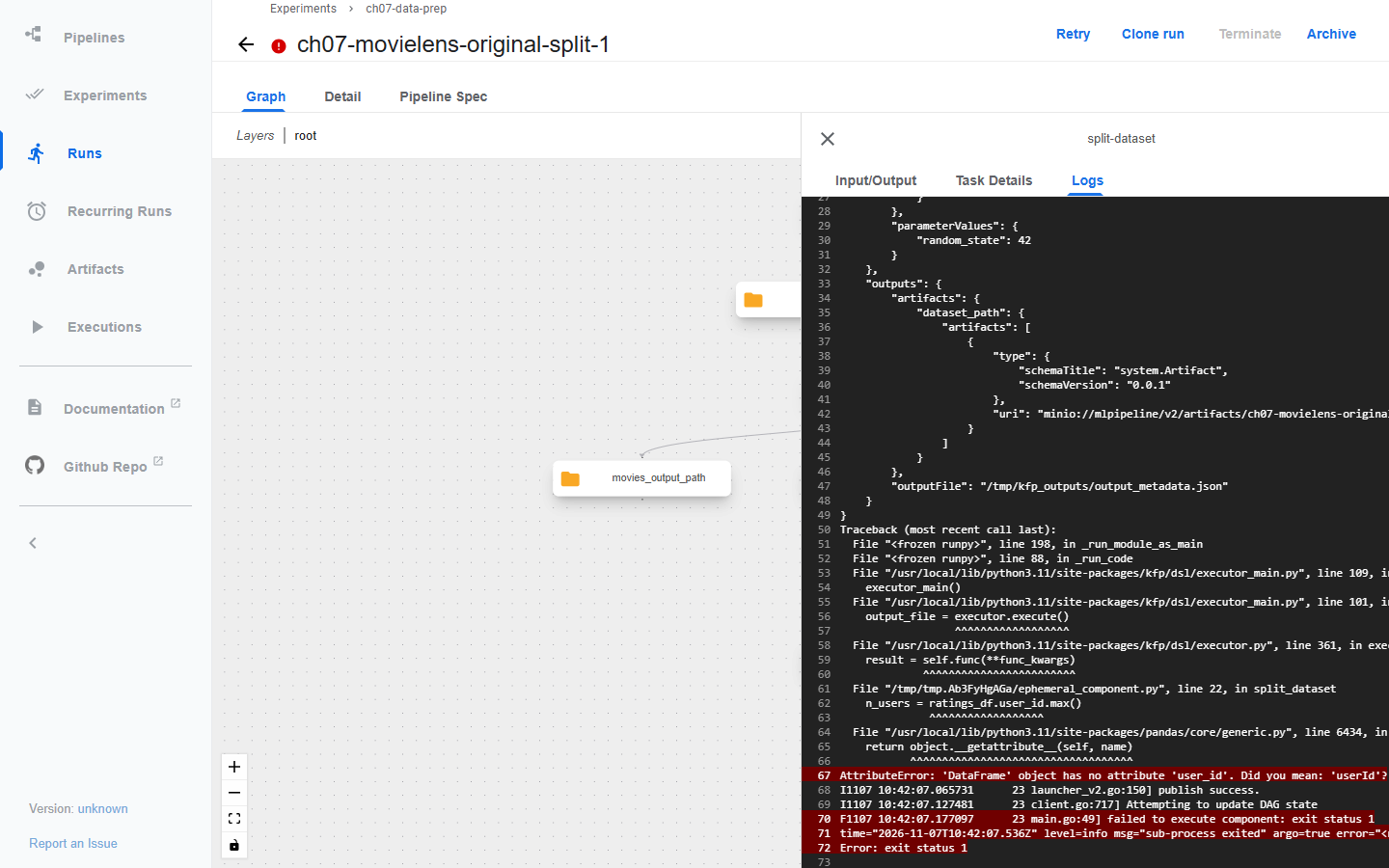
n_users = ratings_df.user_id.max()
AttributeError: 'DataFrame' object has no attribute 'user_id'. Did you mean: 'userId'?
MovieLens의 열 이름은 userId, movieId, rating, timestamp다. 그런데 원본 split_dataset에는 ratings_df.user_id, ratings_df.item_id로 최대값을 읽는 두 줄이 남아 있다. 앞의 CSV 변환에도 이 이름으로 바꾸는 단계가 없으니 25M을 받아도 같은 줄에서 실패한다.
두 값은 함수 뒤쪽에서 쓰이지 않는다. 그래서 split_ratings에서는 이 두 줄만 지웠다. 학습 전처리도 userId, movieId를 쓰므로, 이 두 줄을 통과시키려고 열 이름 전체를 바꾸지는 않는다. 컴파일은 DataFrame 연산까지 실행하지 않는다. YAML이 만들어졌다고 이 오류가 걸러지는 것은 아니다.
D-3. 고친 준비 파이프라인 실행
수정 파이프라인을 만든다. 원본은 QA가 분할 업로드(
u2) 뒤에만 돌았는데, 여기서는 movies 업로드(u1)도 기다리게 했다.ch07\movielens_fixed_pipeline.py로 저장한다."""MovieLens preparation with the schema fix, prefix parameter and full QA.""" import sys from pathlib import Path from kfp import compiler, dsl sys.path.insert(0, str(Path(__file__).resolve().parents[1] / "upstream" / "movie-recommender-project")) from data_components import csv_to_parquet # noqa: E402 from movielens_components import ( # noqa: E402 download_movielens, put_to_s3, qa_movielens, split_ratings, unzip_movielens) @dsl.pipeline(name="ch07-movielens-prep") def pipeline(minio_bucket: str = "datasets", dataset: str = "ml-latest-small", random_init: int = 42, min_total_rows: int = 100000): download = download_movielens(dataset=dataset) unzip = unzip_movielens(input_path=download.outputs["output_path_one"], dataset=dataset) ratings = csv_to_parquet(inputFile=unzip.outputs["ratings_output_path"]) movies = csv_to_parquet(inputFile=unzip.outputs["movies_output_path"]) split = split_ratings(input_parquet=ratings.output, random_state=random_init) u1 = put_to_s3(inputFile=movies.output, upload_file_name="movies.parquet.gzip", bucket=minio_bucket, prefix=dataset) u2 = put_to_s3(inputFile=split.output, bucket=minio_bucket, prefix=dataset) qa = qa_movielens(bucket=minio_bucket, dataset=dataset, min_total_rows=min_total_rows).after(u1, u2) for task in [download, unzip, ratings, movies, split, u1, u2, qa]: task.set_caching_options(False) if __name__ == "__main__": compiler.Compiler().compile(pipeline, "ch07_movielens_prep.yaml")컴파일하고 실행한다.
Push-Location ch07
python movielens_fixed_pipeline.py
Pop-Location
python ch07\submit.py ch07\ch07_movielens_prep.yaml ch07-movielens-prep --run ch07-movielens-prep-1
이번 실행은 약 7분 걸렸고, 대부분은 작업 Pod마다 pandas와 pyarrow를 설치하는 시간이었다. 여덟 작업이 모두 초록색이면 된다.
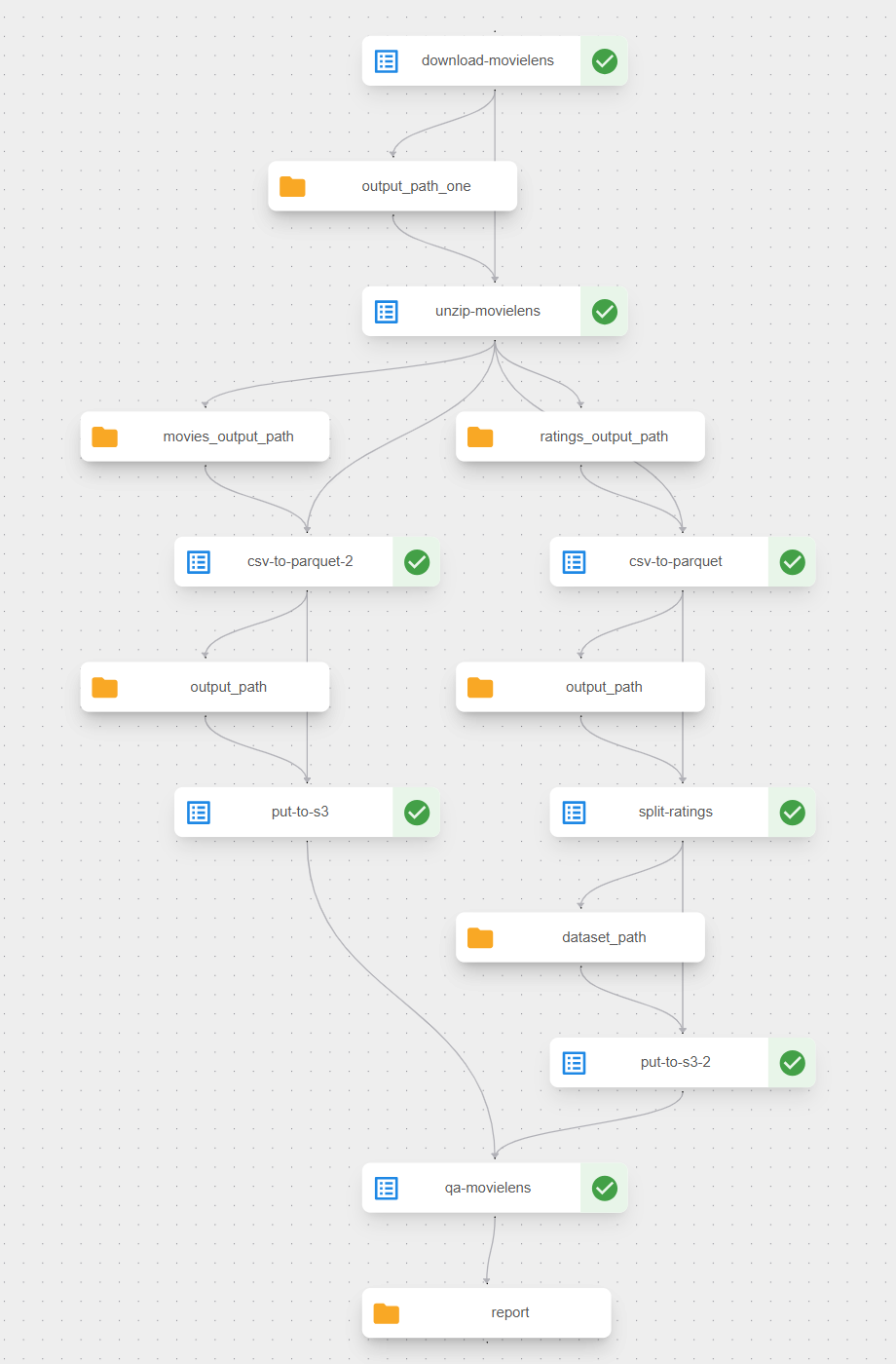
그래프의
csv-to-parquet과csv-to-parquet-2는 같은 컴포넌트를 ratings와 movies에 한 번씩 쓴 것이다.put-to-s3,put-to-s3-2도 마찬가지다.http://localhost:8888/buckets/datasets/ml-latest-small/ 에서 네 파일을 확인한다.
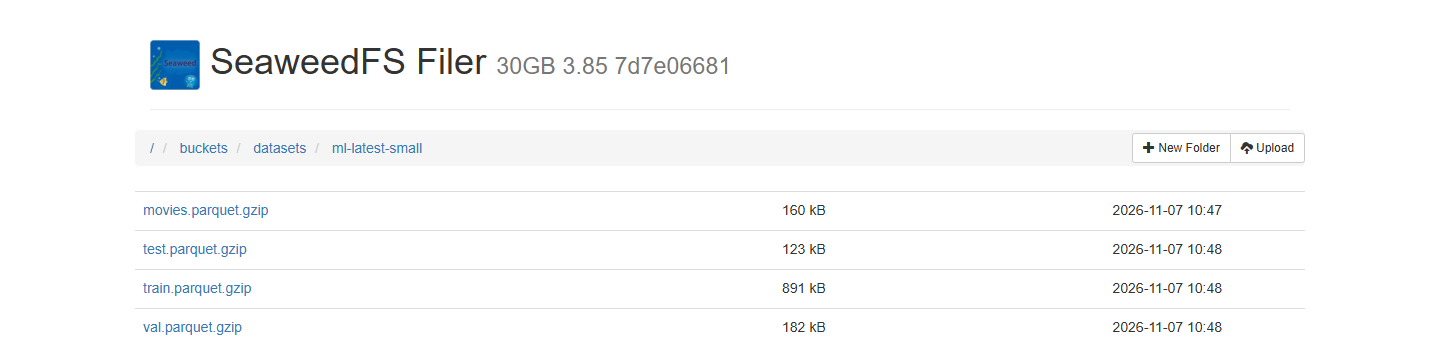
datasets
  ml-latest-small
    movies.parquet.gzip
    train.parquet.gzip
    val.parquet.gzip
    test.parquet.gzip
원본의 put_to_minio는 create_bucket이 BucketAlreadyExists를 던질 때만 넘어간다. 같은 계정이 이미 만든 버킷이면 S3 구현에 따라 BucketAlreadyOwnedByYou가 올 수 있어서, 수정본은 head_bucket으로 먼저 확인한다. 이 부분은 코드를 읽고 고친 것이고, 원본 업로드를 이 환경에서 따로 돌려 보지는 않았다. Pod에서 쓰는 S3 주소 http://minio-service.kubeflow:9000과 계정은 책과 같다.
D-4. QA가 검사하는 것
저자의
qa_data를 작은 데이터에 그대로 돌려 본다.ch07\movielens_original_qa_pipeline.py로 저장한다."""Author's qa_data unchanged, pointed at the small dataset uploaded by ch07-movielens-prep.""" import sys from pathlib import Path from kfp import compiler, dsl sys.path.insert(0, str(Path(__file__).resolve().parents[1] / "upstream" / "movie-recommender-project")) from data_components import qa_data # noqa: E402 @dsl.pipeline(name="ch07-movielens-original-qa") def pipeline(minio_bucket: str = "datasets", dataset: str = "ml-latest-small"): qa_data(bucket=minio_bucket, dataset=dataset).set_caching_options(False) if __name__ == "__main__": compiler.Compiler().compile(pipeline, "ch07_movielens_original_qa.yaml")Push-Location ch07 python movielens_original_qa_pipeline.py Pop-Location python ch07\submit.py ch07\ch07_movielens_original_qa.yaml ch07-movielens-original-qa --run ch07-movielens-original-qa-1qa-data → Logs에서
AssertionError를 확인한다.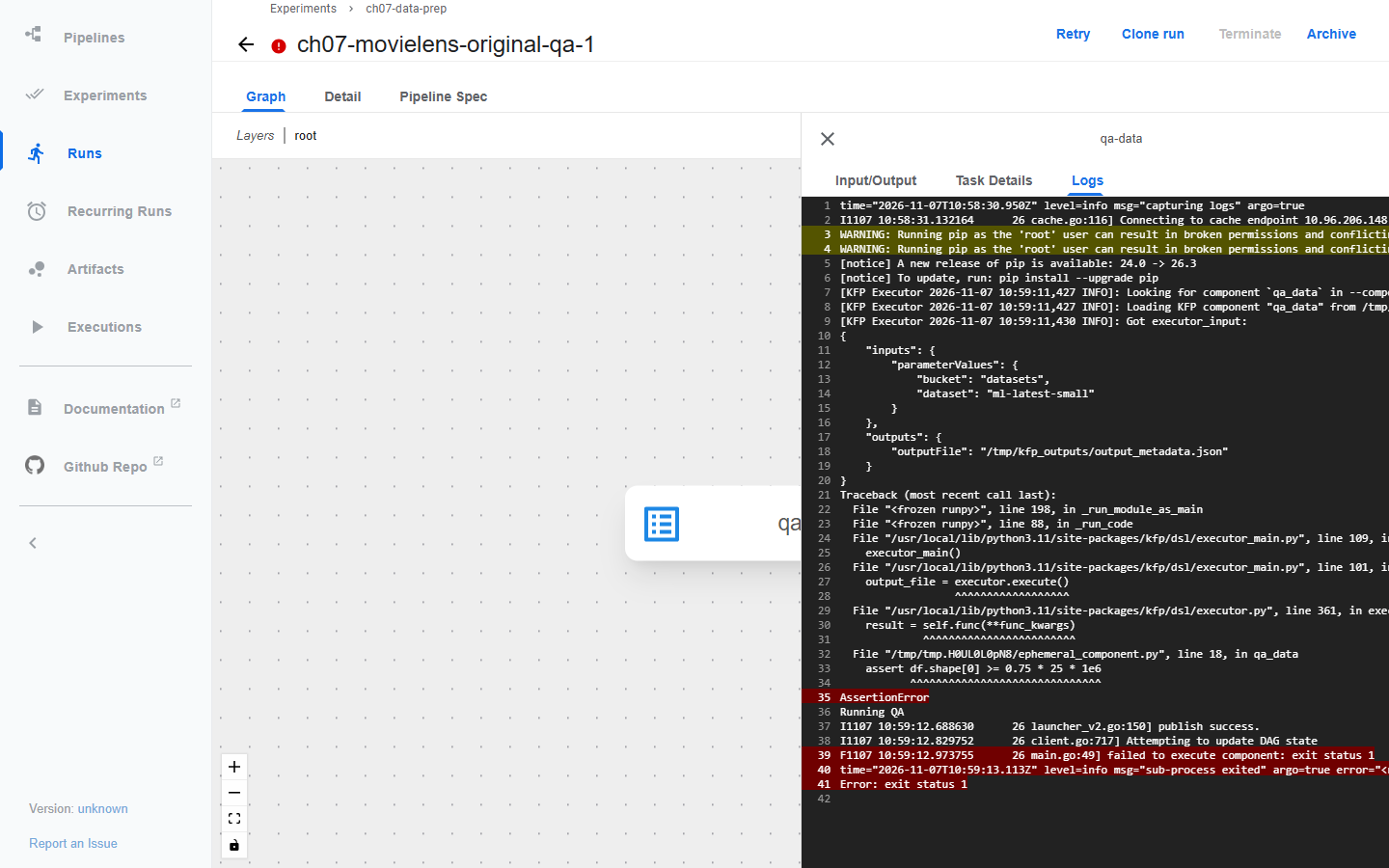
원본은 train의 열 수가 4인지, 행 수가
0.75 × 25 × 1,000,000이상인지 assert로 확인한다. 작은 자료의 train은 75,627행이라 데이터에 아무 문제가 없어도 실패한다. 거꾸로 열 이름이 틀리거나 평점이 범위를 벗어나도, 열이 네 개이고 행만 많으면 통과한다.D-3 실행의 qa-movielens → Logs를 연다.
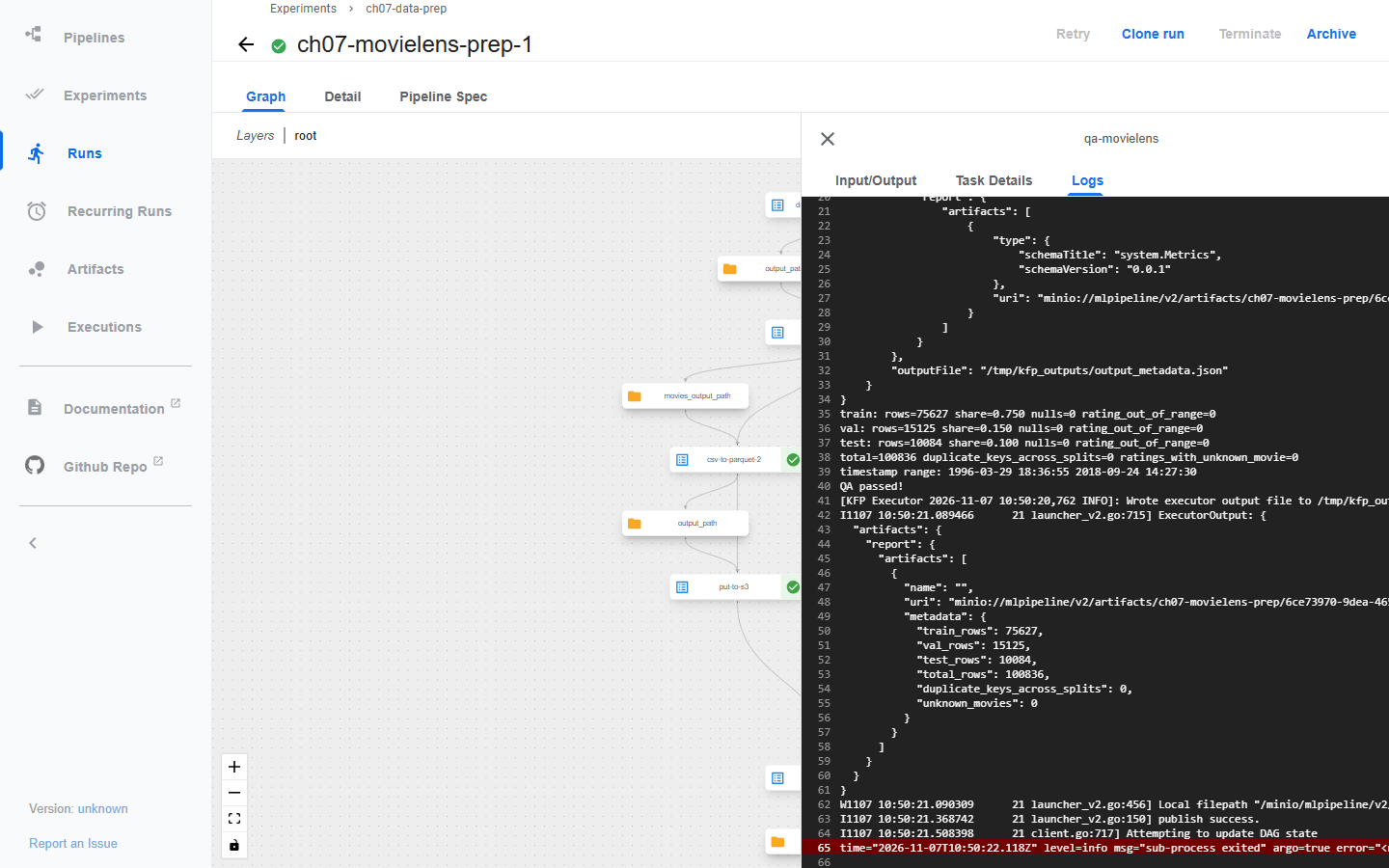
train: rows=75627 share=0.750 nulls=0 rating_out_of_range=0
val: rows=15125 share=0.150 nulls=0 rating_out_of_range=0
test: rows=10084 share=0.100 nulls=0 rating_out_of_range=0
total=100836 duplicate_keys_across_splits=0 ratings_with_unknown_movie=0
timestamp range: 1996-03-29 18:36:55 2018-09-24 14:27:30
QA passed!
수정 QA가 확인하는 범위와 아직 남은 것은 다음과 같다.
| 확인 범위 | 이번 QA | 추가로 볼 내용 |
|---|---|---|
| 스키마 | 네 분할의 열 이름과 순서 | 타입과 시간 단위 |
| 식별자 | userId, movieId 결측, movies에 없는 영화 | 중복 키의 의미 |
| 값 | 평점 0.5~5.0 범위 | 잘못된 timestamp |
| 분할 | 행 수와 비율, (userId, movieId) 키의 분할 간 중복 | 시간 순서와 분할 목적의 적합성 |
| 저장 결과 | 네 파일이 모두 읽히는지 | 같은 원천 버전의 묶음인지, 이전 실행의 파일이 섞이지 않았는지 |
| 재현 정보 | 다운로드 아티팩트의 sha256 메타데이터 | 코드 커밋과 산출물 위치를 함께 남기는 manifest |
min_total_rows는 파라미터라서 25M을 쓸 때는 dataset=ml-25m, min_total_rows=25000000으로 바꿔 실행하면 된다. 이 조합은 이번에 돌려 보지 않았다.
E. 결과 정리와 다음 단계
⑩을 마치고 ⑪, ⑫로 넘어가기 전에 결과를 모은다.
E-1. 실행 기록 확인
KFP의 Experiments → ch07-data-prep에서 일곱 실행을 본다.
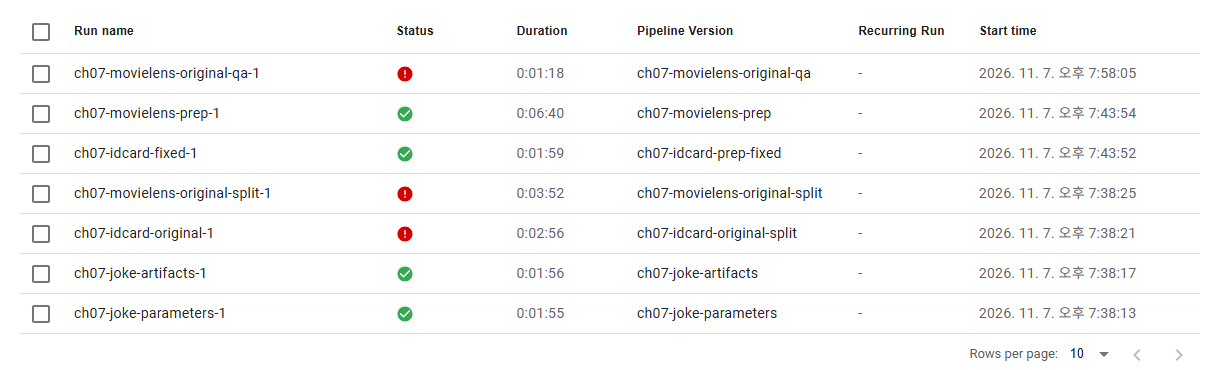
| 실행 | 결과 | 확인한 것 |
|---|---|---|
ch07-joke-parameters-1 | 성공 | 값으로 전달되는 파라미터 |
ch07-joke-artifacts-1 | 성공 | 주소로 전달되는 아티팩트 |
ch07-idcard-original-1 | 실패 | 저자 분할의 이미지와 라벨 어긋남, clip 중복 |
ch07-idcard-fixed-1 | 성공 | stem 짝짓기와 clip 단위 분할 |
ch07-movielens-original-split-1 | 실패 | user_id 열 이름 오류 |
ch07-movielens-prep-1 | 성공 | 네 parquet 업로드와 수정 QA |
ch07-movielens-original-qa-1 | 실패 | 25M 고정 행 수 조건 |
실패한 실행도 지우지 않는다. 어떤 입력과 코드에서 어떻게 실패했는지가 수정의 근거가 된다.
E-2. 무작위 분할과 서비스의 시간
책 코드의 무작위 분할은 예제 흐름을 이해하는 출발점으로 충분하다. 실제로 미래 추천을 평가하려면 학습에 미래 평점이 섞이지 않는지, 사용자별 시점과 후보 영화를 어떻게 정할지 따로 설계해야 한다. 이번 QA의 timestamp 범위는 세 분할이 모두 1996~2018년을 섞어 갖는다는 뜻이다.
신규 사용자 추천과 기존 사용자의 미래 행동 예측도 서로 다른 평가 문제다. 시간 순서로 한 번 나눴다고 두 문제를 모두 검증한 것은 아니다.
누수의 원인은 도메인마다 다르다. 탐지에서는 C-2에서 본 clip 중복처럼 문서, 영상, 사람의 중복이, 추천에서는 미래 행동과 집계값이 문제가 된다.
E-3. 데이터 계약 예시
다음 YAML은 실행 설정이 아니다. MovieLens 출력의 확인 항목을 정리한 예시로, 이번 수정 QA가 구현한 항목과 남은 항목을 함께 적었다.
dataset: movie-ratings
contract_version: "1"
location: s3://datasets/ml-latest-small/
required_columns: [userId, movieId, rating, timestamp]
checks:
  - identifiers_are_not_null          # 구현
  - ratings_are_within_agreed_range   # 구현, 0.5~5.0
  - all_expected_splits_are_present   # 구현
  - no_key_overlap_across_splits      # 구현
  - timestamps_use_the_agreed_unit    # 남음
split:
  source_example: random_75_15_10
  evaluation_purpose: define_before_training
lineage:
  - source_checksum                   # 다운로드 아티팩트 메타데이터
  - code_commit
  - split_seed
  - output_snapshot
on_failure:
  action: stop_and_keep_diagnostic_results
검사가 실패하면 학습으로 넘기지 않고 원천 식별자와 오류 보고서를 보관한다. 원본을 덮어써서 고치면 어떤 입력에서 실패했는지 재현하기 어렵다. 신분증 데이터와 진단 자료는 허용된 접근과 보존 범위 안에서 다룬다.
E-4. 실패 위치와 확인할 것
| 증상 | 확인할 것 |
|---|---|
| Notebooks 메뉴가 없음 | KFP standalone과 전체 Kubeflow 설치의 차이 |
신분증 다운로드 작업이 tarfile 오류로 실패 | Box 주소의 HTTP 404, C-1의 S3 원천으로 교체했는지 |
| PC의 파일을 다음 Pod가 찾지 못함 | KFP 입출력 아티팩트 또는 실제 공유 볼륨 연결 |
| 이미지나 라벨이 0개로 잡힘 | 압축 내부의 MINIDATA/DATA 경로와 해제 결과 |
| 이미지와 박스가 맞지 않음 | stem 대응, 좌표 형식, 변환과 분할 이전의 파일 쌍 |
| MovieLens split의 AttributeError | user_id/item_id와 실제 CSV 열 이름 차이 |
| 업로드 단계 실패 | Pod 기준 S3 주소, 버킷 생성 권한과 기존 버킷 처리 |
| 작은 데이터에서 저자 QA 실패 | 25M 전체 자료를 전제로 한 고정 행 수 조건 |
| QA는 성공했지만 후속 학습 실패 | 열 이름과 타입, 모든 분할과 movies 객체의 존재 여부 |
작업 Pod가 ImagePullBackOff | docker.io 시간 초과, B-2의 이미지 적재 방법 |
kind load docker-image의 content digest not found | docker save --platform linux/amd64로 저장한 뒤 kind load image-archive |
작업이 오래 Running | Pod 안의 pip install, 처음 실행은 패키지 설치 시간이 대부분 |
다운로드 코드에서는 HTTP 성공 여부, TLS 검증, 압축 파일 형식도 확인한다. ZIP이나 tar는 경로를 검증해 의도한 작업 폴더 안에만 풀고, 외부 응답을 검증 없이 학습 데이터로 취급하지 않는다.
E-5. 실습 종료
- JupyterLab 창을
Ctrl+C로 끈다. - 8장에서 이 데이터를 쓸 계획이면 클러스터와 버킷은 그대로 둔다. 7장 결과만 지우려면 저장소 화면에서
ch07-raw버킷과datasets/ml-latest-small폴더를 지우고, KFP에서ch07-실행을 Archive한 뒤 파이프라인을 삭제한다. - 클러스터 전체를 지우는 방법은 4장의 실습 종료와 같다.
로컬 노트북과 컴파일을 끝내도 클러스터의 실행 기록과 S3 객체는 따로 남는다. 이전 장의 클러스터를 지우기보다, 남길 실행의 아티팩트와 데이터 스냅샷을 골라 관리한다.